Payment solution overview
This chapter provides an overview of the required applications and how they work together as a payment solution. The transaction flow is described step by step.
Partner application, payment library and Terminal application
The App-2-app integration for the Sunmi Android platform consists of two applications and one library:
-
The Partner application: Android based application developed by the partner integrating with CM POS Payments payment solution for payment acceptance
-
The CM POS Payments Terminal application: handling card entry and the payment flow. It can perform payments and refund transactions. Also handles receipts for transactions.
-
The CM Payments Android POS integration library: provides functionality to handle transactions on the gateway. It requests transaction data to Partner application and forwards it to the terminal application. It also provides functionality to get information about old transactions and other info that may be useful for integrators, such as current currency code used by Terminal application.
Partners need to have their Android app running on the same physical device as the CM POS Payments Terminal application and include the CM Payments Android POS integration library as a dependency on their app.
Transaction Flow
In this section we explain how the Partner application initiates a transaction and we describe both the transaction flow through the Terminal application and the interactions between it and the user.
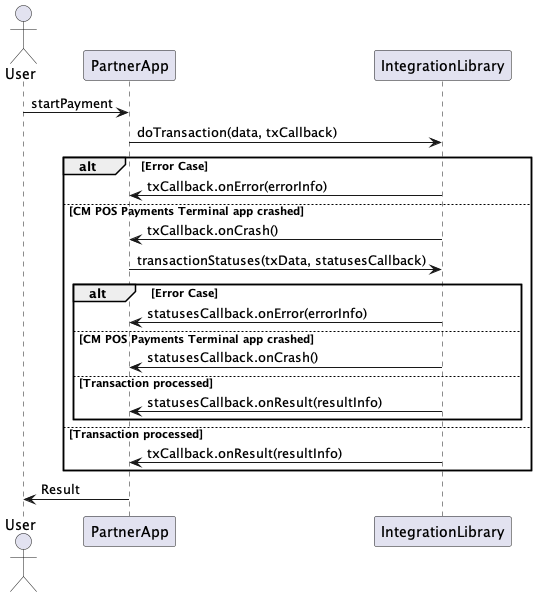
The basic functioning of the Integration library is that Partner Applications can send the transaction request (doTransaction() method on the Integration service class inside the Integration library) together with the call-back object. Once the result of the transaction is received, the library will trigger the appropriate call-back method.
A transaction starts with the merchant entering an amount. The device is then handed over to the cardholder, who presents their card, authorizes the transaction, and receives the transaction outcome. The device is then handed back to the merchant and, if needed, receipts are printed.
Transition between applications is seamless and the entire flow appears as if it is handled by the ECR application alone. This is done thanks to the integration library which integrates the call to the Terminal application within partner’s application context.
Also, it is important to mention that transaction flow in Terminal application does not manifest itself to the user in any way. When Terminal application is opened from the launcher screen it starts some functionality checks, such as terminal configuration availability, correct keys on device, network connection and gateway availability, and after those checks are finished, a banner advising the user to switch to an ECR application (In this case, the partner application) is displayed.
It is important to point out that while the Terminal application UI is visible during a transaction, it is not possible to interact with the Partner application.
You can also see on the diagram that sdk takes into account the possibility that the Terminal application or device can crash by any reason. In that case, Partner App should request the status of the transaction to be certain about the result of the operation. (see "Dealing with unexpected scenarios" chapter)
I18n and language negotiation
The default language in which the user interface is presented by the CM POS Payments application is the language configured in the shop configuration in the Gateway. It is expected that the partner application does the same.
The CM POS Payments application will switch to the cardholder preferred language if suggested by the EMV card and if the translation into this language exists. The CM POS Payments application will switch language, if applicable, after the language setting on the card has been read.
It is the responsibility of the partner application developers to make their application support the languages they want to use.
If the partner wants to override the language set for the shop, they can provide a language code to the CM POS Payments applications. The CM POS Payments applications will use that language, provided it is supported by our applications. If a language code is provided that is not supported by CM POS Payments, our applications will default to the English language.