Upper layer protocol
General structure of a message
Messages are sent via TCP.
Message Layout
A message consists of a header and a body and some additional related data fields.

The message header has a fixed length of 12 bytes, and contains the following fields:
Field | Length (bytes) | Description |
Magic Number | 1st - 4th | Static value. Always 0x65, 0x70, 0x6f, 0x73 |
Message Length | 5th - 8th | Consist of: 1 . Body length. 2 . Sender Address (1 byte). 3 . Receiver Address (1 byte). 4 . Protocol Version (1 byte). 5 . Protocol Type (1 byte). |
Sender Address | 9th | Reserved for future use. |
Receiver Address | 10th | Reserved for future use. |
Protocol Version | 11th | Protocol version used. |
Protocol Type | 12th | Protocol type used. |
The following messages are part of this protocol:
Message Metadata
The following format is used to describe the message definitions from the CM.com IPP Payments perspective:
| Tag Name | Tag Code | Required |
|---|---|---|
| <TLV tag name> | <TLV tag> | M/O/C |
Message format from CM.com IPP Payments Platform perspective
The first column describes the TLV tag name. When the tag name is preceded by a > (greater-than symbol), the tag is part of the constructed tag at the level above. When the tag name is preceded by >> (double greater-than symbols), the tag is a child of the previously constructed tag at the higher level. The second column contains the code for the TLV tag used for this field. The third column describes whether the tag is Mandatory, Optional or Conditional. When a tag is conditional, the conditions are listed after the message definition.
The following format is used to describe the message definitions from the payment terminal perspective:
| Tag Name | Tag Code | EMV | Swipe |
|---|---|---|---|
| <TLV tag name> | <TLV tag> | M/O/C/- | M/O/C/- |
Message format from Payment Terminal Perspective
The first column describes the TLV tag name. When the tag name is preceded by a > (greater than character) the tag is part of the constructed tag on the level above it. The second column contains the code for the TLV tag used for this field. The third column indicates whether the tag is Mandatory, Optional, Conditional or - Not applicable for EMV transactions. The fourth column specifies whether the tag is Mandatory, Optional, Conditional or - Not applicable for Magstripe transactions.
All outgoing messages (AUTHORIZATION_REQUEST, TRANSACTION_RESULT, TRANSACTION_CANCEL, PRINT_REQUEST and PRE_AUTH_OPERATION_REQUEST) need to include a METADATA container tag, directly adjacent to the header.
The payment terminal identifying tags [Terminal model, Terminal brand and Interface Device (IFD) Serial Number] are values that are determined with CM.com IPP Payments Platform during onboarding.
The message will be formatted as follows: HEADER + METADATA (0x7FE000) + CONTENT (0x7FE100).
| Tag Name | Tag | M/O/C |
|---|---|---|
| Metadata | 7FE000 | M |
| > Application Dialog Variant (02) | 5FE012 | M |
| > Application Protocol Version | 7FE010 | M |
| >> Application Protocol Major Version (00 04) | 5FE010 | M |
| >> Application Protocol Minor Version (00 03) | 5FE011 | M |
| > Application Identification | 7FE012 | M |
| >> Terminal brand | 5FE101 | M |
| >> Terminal model | 5FE102 | M |
| >> Interface Device (IFD) Serial Number | 9F1E | M |
| >> Terminal application version | 5FE130 | M |
| >> Terminal application build date | 5FE131 | O |
| >> SPHS version | 5FE132 | C1 |
| >> SDK version | 5FE133 | C1 |
| >> ROM version | 5FE134 | C1 |
| >> OS version | 5FE135 | C1 |
| Content | 7FE100 | M |
| > Normal message content | - | M |
Metadata
Note
- C1 - Mandatory only for CM Terminals.
AUTHORIZATION_REQUEST (0310)
The AuthorizationRequest combines all the information needed to connect the device to the CM.com IPP Payments Platform (this information will be used to validate if that the terminal is a registered terminal) and all the information needed to start a payment.
This section contains a set of tags, indicating whether each tag is mandatory, conditional or optional from a business perspective.
| Tag Name | Tag | EMV | Swipe |
|---|---|---|---|
| Command identifier | 5FE000 | M | M |
| Terminal key serial number | 5FE310 | M | M |
| Terminal Type | 9F35 | M | M |
| Terminal Capabilities | 9F33 | M | M |
| Additional Terminal Capabilities | 9F40 | M | M |
| Cardholder Verification Method (CVM) List | 8E | M | - |
| CVM Results | 9F34 | M | - |
| Terminal Verification Results (TVR) | 95 | M | O |
| Application Cryptogram | 9F26 | M | - |
| Cryptogram Information Data | 9F27 | M | - |
| Issuer Application Data | 9F10 | M | - |
| Unpredictable Number | 9F37 | M | - |
| Application Interchange Profile | 82 | M | - |
| Dedicated File (DF) Name | 84 | M | - |
| Application Version Number – terminal | 9F09 | M | - |
| Point of service entry mode | 9F39 | M | M |
| Transaction status information | 9B | O | - |
| EMV Transaction type | 9C | M | - |
| Terminal country code | 9F1A | M | - |
| Transaction date | 9A | M | M |
| Transaction time | 9F21 | M | M |
| Terminal SCA support | 5FE108 | M | - |
| Transaction Sequence Counter | 9F41 | M | - |
| CM Transaction Type | 5FE303 | M | M |
| Amount Entry | 7FE320 | M | M |
| > Amount display string | 5FE321 | M | M |
| > Transaction Currency Exponent | 5F36 | M | M |
| > Transaction Currency Code | 5F2A | M | M |
| > Amount, Authorized (Binary) | 81 | M | M |
| > Amount, Gratuity Authorised Amount | 5FE34C | C4 | C4 |
| Encrypted cardholder data | 5FE312 | M | M |
| > PAN | 5A | M | - |
| > Track 2 Equivalent Data | 57 | M | - |
| > TRACK2DATA | 5FE313 | - | M |
| > Application Effective Date | 5F25 | C2 | - |
| > Application Expiration Date | 5F24 | C2 | - |
| > PAN Sequence Number | 5F34 | C2 | - |
| > Service Code | 5F30 | C2 | - |
| AID entry | 7FE306 | M | - |
| > Application identifier (AID) | 4F | M | - |
| > Application label | 50 | M | - |
| > Application preferred name | 9F12 | C2 | - |
| > Issuer Code Table Index | 9F11 | C2 | - |
| > Application priority indicator | 87 | C2 | - |
| > Language preference | 5F2D | C2 | - |
| > Application Selection Registered Proprietary Data | 9F0A | C2 | - |
| > Issuer Identification Number Extended | 9F0C | C2 | - |
| > Issuer Identification Number | 42 | C2 | - |
| Transaction identifier | 5FE300 | C1 | C1 |
| Application Identifier (AID) – terminal | 9F06 | C6 | - |
| Application Transaction Counter (ATC) | 9F36 | C2 | - |
| Application usage control | 9F07 | C2 | - |
| Form factor indicator | 9F6E | C2 | - |
| Issuer country code | 5F28 | C2 | - |
| Transaction category code | 9F53 | O | - |
| Issuer action code – Default | 9F0D | C2 | - |
| Encrypted PIN block | 5FE311 | C5 | C5 |
| Original reference STAN | 5FE306 | C3 | C3 |
| Original reference date | 5FE307 | C3 | C3 |
| EMV PIN try counter | 9F17 | C2 | C2 |
| Merchant order reference | 5FE341 | O | O |
| PIN length | 5FE315 | O | O |
| Amount authorized numeric | 9F02 | O | - |
| Cardholder data length | 5FE346 | O | O |
AuthorizationRequest.
Note
C1 - Mandatory in the cloud flow and must also be included in transactions where multiple AUTHORIZATION_REQUESTs are sent, such as in SCA flows or PIN retry scenarios Multiple Authorization Request.
C2 - Present if it is present on the card.
C3 - present if the tag
CM Transaction Type 5FE303CM Payment Transaction Types is Refund or PRE_AUTH_OPERATION_REQUEST (0381).C4 - present if being onboarded to use the feature tipping.
C5 - Present if CVM is Online PIN.
C6 - If tag 4F is not available then tag 9F06 shall be present.
-
Remarks
-
For the PURCHASE flow, the following transaction type tags must be set:
EMV Transaction Type (9C)=00details here: EMV Transaction Types, andCM Transaction Type (5FE303)=0x0001details here: CM Payment Transaction Types. -
For the MAT flow, the following transaction type tags must be set:
EMV Transaction Type (9C)=00details here: EMV Transaction Types, andCM Transaction Type (5FE303)=0x0002details here: CM Payment Transaction Types. -
For the REFUND flow, the following transaction type tags must be set:
EMV Transaction Type (9C)=20details here: EMV Transaction Types, andCM Transaction Type (5FE303)=0x0004details here: CM Payment Transaction Types. -
For the PRE-AUTH flow, the following transaction type tags must be set:
EMV Transaction Type (9C)=00details here: EMV Transaction Types, andCM Transaction Type (5FE303)=0x0005details here: CM Payment Transaction Types. -
Terminal SCA support possible values for the tag
TERMINAL_SCA_SUPPORT 5fe108details here: Multiple Authorization Request -
The terminal time is now assessed and compared to the store’s time. If the deviation is significant, the platform will terminate the transaction. In such cases, the abort message will include the new result code: INCORRECT TIME (0x0F03).
-
| Responses |
|---|
| AUTHORIZATION_RESPONSE |
| ABORT |
Possible responses to the AuthorizationRequest
AUTHORIZATION_RESPONSE (0311)
The AuthorizationResponse, among other data can include issuer scripts that the terminal must forward to the card, so the card can process them and generate the second AC that contains the result of that process. This could happen if the card has been inserted into the terminal and an ICC transaction was performed.\
The result of handling such action need to be sent in the subsequent TRANSACTION_RESULT (0320) message.
| Tag Name | Tag | M/O/C |
|---|---|---|
| Command identifier | 5FE000 | M |
| Command result code | 5FE001 | M |
| Transaction identifier | 5FE300 | M |
| Authorization Response Code | 8A | M |
| Gateway Data | 7FE340 | O |
| > STAN | 5FE34A | C2 |
| Authorization Code | 89 | C1 |
| Acquirer data | 5FE33A | O |
| Pre Auth Valid Date | 5FEF01 | C3 |
| Pre Auth Valid Time | 5FEF02 | C3 |
| Issuer Authentication Data | 91 | C4 |
| Issuer Script Template 1 | 71 | C4 |
| Issuer Script Template 2 | 72 | C4 |
AuthorizationResponse.
Note
C1 -Present if the data being made available by the financial institutions in the payment chain.
C2 - Present if available in the CM IPP Payments Platform.
C3 -Present only for the Pre-Authorization.
C4 - Present for EMV transactions and required by issuer.
-
Remarks
- If the result code tag
5FE001indicatesPIN_INCORRECT_RETRY [0301],SCA_ADDITION_REQUIRED [0x030D]orCONTACT_CHIP_REQUIRED [0x030E], then an additional AuthorizationRequest must be performed with the same transaction identifier or a TransactionCancel with the transaction identifier.
- If the result code tag
PRE_AUTH_OPERATION_REQUEST (0381)
A pre-authorization is a transaction in which a specific amount is temporarily reserved on the customer’s account balance without the payment being processed immediately.
This amount is reserved to ensure that funds are available to cover the cost of a future transaction, commonly used for hotel reservations, car rentals, or EV charging / Fuel dispensing.
Once the service or delivery of goods is completed, the pre-authorization can either: be updated by increasing the pre-authorization amount, or be finalized by fully or partially capturing the pre-authorized amount or canceling it.
The validity period of a pre-authorization depends on the policies of the card brand.
For the pre-authorization operation, there are distinct scenarios: Finalize a Pre-Authorization (which includes Confirmation and Cancellation) and Update a Pre-Authorization.
For comprehensive information regarding these scenarios, please click here: PRE-AUTH CANCELLATION / CONFIRMATION / UPDATE
There are exceptions based on the processor and acquirer requirements for using the pre-authorization functionality. Please consult with the CM Product Team during onboarding to determine the best setup, as well as the rules and details for its usage in your specific context.
| Tag Name | Tag | M/O/C |
|---|---|---|
| Command identifier | 5FE000 | M |
| CM Transaction Type | 5FE303 | M |
| Original stan reference | 5FE306 | M |
| Original date reference | 5FE307 | M |
| Amount entry | 7FE320 | C1 |
| > Amount display string | 5FE321 | C1 |
| > Transaction Currency Exponent | 5F36 | C1 |
| > Transaction Currency Code | 5F2A | C1 |
| > Amount, Authorized (Binary) | 81 | C1 |
| Merchant reference order | 5FE341 | O |
Pre-Auth-Operation.
Note
- C1 - Present if it is a CONFIRM_PRE_AUTH (0x0006) or UPDATE_PRE_AUTH (0x0008); optional for CANCEL_PRE_AUTH.
-
Remarks
-
5FE303 - CM Transaction typeCM Payment Transaction Types should be used only for CONFIRM_PRE_AUTH (0x0006), CANCEL_PRE_AUTH (0x0007) or UPDATE_PRE_AUTH (0x0008). -
For UPDATE_PRE_AUTH amount has no restrictions.
-
For each pre-authorization operation request, the validity period will be checked. If the request refers to a transaction whose validity period has expired, the result code TRANSACTION_EXPIRED (0x0F02) will be returned.
-
| Responses |
|---|
| ABORT |
| TRANSACTION COMPLETE |
Possible responses to Pre-Auth-Operation.
Transaction Completion Dialog
The dialog for the completion of the transaction consists of two messages TRANSACTION_RESULT (0320) and TRANSACTION_COMPLETE (03FF).
TRANSACTION_RESULT (0320)
After all parties—the card, terminal, CM.com IPP Payments Platform, processor/acquirer, and issuer—have successfully authorized the financial transaction, the terminal sends a TransactionResult to the CM.com IPP Payments Platform to complete the transaction. It is important to mention that the final decision on the result code of the message lies with the card. A transaction is immutable upon the receipt of the TransactionResult by the CM.com IPP Payments Platform.
| Tag Name | Tag | EMV | Swipe |
|---|---|---|---|
| Command identifier | 5FE000 | M | M |
| Command result code | 5FE001 | M | M |
| Transaction identifier | 5FE300 | M | M |
| Amount entry | 7FE320 | M | M |
| > Amount display string | 5FE321 | M | M |
| > Transaction Currency Exponent | 5F36 | M | M |
| > Transaction Currency Code | 5F2A | M | M |
| > Amount, Authorized (Binary) | 81 | M | M |
| > Amount, Gratuity Authorised Amount | 5FE34C | C1 | C1 |
| Terminal Verification Results (TVR) | 95 | M | O |
| Application Cryptogram | 9F26 | M | - |
| Cryptogram Information Data | 9F27 | M | - |
| Transaction Status Information (TSI) | 9B | O | - |
TransactionResult
Note
- C1 - Present if the transaction type, card and terminal capabilities, and the specific processes performed during the transaction are provided.
DELAYED TRANSACTION RESULT
The Processor Style Protocol supports what is called a “delayed transaction result.” This feature allows the customer up to 24 hours between the messages AUTHORIZATION_REQUEST (0310) and TRANSACTION_RESULT (0320) to complete the transaction. Within this time frame, the messages are still considered part of the same transaction. If more than 24 hours elapse between the AUTHORIZATION_RESPONSE (0311) and the TRANSACTION_RESULT (0320) sent by the terminal, the transaction is aborted, sending an ABORT (FFFF) message with the result code TRANSACTION_EXPIRED (0x0f02) to the terminal.
This functionality is of particular interest to integrators whose solutions require waiting time between a successful AuthorizationResponse and the dispatch of goods or rendering of services. Additionally, it allows for recovery in case of connection drops.
To use the “delayed transaction result” functionality, please consult with the CM Product Team during onboarding to determine the best setup for the rules around its usage, based on the specific context.
| Responses |
|---|
| TRANSACTION COMPLETE |
| ABORT |
Possible Responses to a TransactionResult.
TRANSACTION_COMPLETE (03FF)
The TransactionComplete message signals the final state and result of the transaction.
| Tag Name | Tag | M/O/C |
|---|---|---|
| Command identifier | 5FE000 | M |
| Command result code | 5FE001 | M |
| Transaction identifier | 5FE300 | M |
| Gateway Data | 7FE340 | O |
| > STAN | 5FE34A | C1 |
TransactionComplete (The tags returned are identical, independent of it being an EMV or swipe transaction).
Note
- C1 -Present if, when the
CM Transaction Type 5FE303CM Payment Transaction Types of the AuthorizationRequest is PRE_AUTH_OPERATION_REQUEST (0381), and it is the value that should be used in theSTAN Original Reference 5FE306in the PRE_AUTH_OPERATION_REQUEST (0381) message.
General Messages
General messages can be sent regardless of transaction phase. The Command result codes are described in the glossary: Command Result Codes
TRANSACTION_CANCEL (0301)
With the TRANSACTION_CANCEL message the terminal can request the cancellation of a transaction that is still in progress. It must be sent before the transaction point of no return (immutable state).
| Tag Name | Tag | M/O/C |
|---|---|---|
| Command identifier | 5FE000 | M |
| Command result code | 5FE001 | M |
| EMV transaction date | 9A | M |
| EMV transaction time | 9F21 | M |
| Amount entry | 7FE320 | M |
| >Amount display string | 5FE321 | M |
| >Transaction Currency Exponent | 5F36 | M |
| >Transaction Currency Code | 5F2A | M |
| >Amount, Authorized (Binary) | 81 | M |
| Transaction identifier | 5FE300 | C1 |
TransactionCancel
Note
C1 - Mandatory if it is known. This tag can be received via two options:
It will be in the authorization response message received for the non cloud flow.
It is received in the initial transaction information for the cloud flow during the polling.
| Possible Response |
|---|
| TRANSACTION COMPLETE |
| ABORT |
Possible Responses to TransactionCancel.
ABORT (FFFF)
In the event of an error, the CM.com IPP Payments Platform may send an ABORT message instead of the expected response message (e.g., AUTHORIZATION_RESPONSE, TRANSACTION_COMPLETE). The ABORT message can include various result codes (see Appendix A.2), but those relevant to the flow of this type of message are:
-
SERVER_BUSY (0x0f01) when a cancel is sent while the transaction is still pending an answer from the financial institutions in the payment chain. An abort message will be sent with the code SERVER_BUSY.
-
TRANSACTION_EXPIRED (0x0f02) when a TRANSACTION_CANCEL (0301) is sent too late for the transaction to be reversed.
-
SYSTEM_ERROR (0xffff) when an unexpected error occurs while handling the request.
| Tag Name | Tag | M/O/C |
|---|---|---|
| Command identifier | 5FE000 | M |
| Command result code | 5FE001 | M |
Abort.
Printing Messages
When receipt printing is supported by the device, using the printing dialog is strongly recommended. If an integrator decides to make use of the printing dialog, CM.com IPP Payments Platform strongly advises to make the printing messages part of the same session used by the terminal to execute the transaction.
CM.com IPP Payments Platform provides the PrintCommand message to integrators for each PrintRequest received.
The message contains all the tags and their values that are necessary to be printed on a receipt by the card.
In addition, the CM.com IPP Payments Platform provides integrators with formatted receipts through the constructed tag FORMATTED_RECEIPTS - 7fe506, which contains the sub-tag RECEIPT_FORMATTED_LINES - 7fe505 twice, within the PrintCommand message.
The first instance of the sub-tag represents the merchant receipt, while the second represents the cardholder receipt. This structure allows integrators to easily differentiate between receipts intended for the merchant and those for the cardholder. Each RECEIPT_FORMATTED_LINES - 7fe505 contains multiple RECEIPT_FORMATTED_LINE - 5fe505 tags. These multiple lines should be read in strict order to ensure that the header, content, and footer are in the correct sequence. This ordering is essential for properly formatted receipt output, with each section displayed in its intended position.
-
Merchant Receipt: is the first sub-tag
RECEIPT_FORMATTED_LINES 7fe505. This receipt includes all necessary data elements required to ensure compliance. -
Cardholder Receipt: is the second sub-tag
RECEIPT_FORMATTED_LINES 7fe505. In specific scenarios, such as during a refund, the formatted cardholder receipt includes a designated area for the cardholder’s signature, as well as an indication that a signature is required. (The space is also included within the formatted lines).
Terminals must use the Transaction Options tag 5FE304 (instead of Transaction Type) to determine the receipt generation logic. The tag value controls signature line placement and refund line printing as follows:
-
Value
0x00(NONE): No signature line is required. -
Value
0x02(REQUEST_SIGNATURE): A signature line is required, and specific refund line printing rules apply.
Receipt Generation Rules Based on Transaction Options (5FE304)
Integrators using the print message to generate receipts must implement the following logic based on the 5FE304 value:
For Purchase Transactions:
-
If CVM performed is Signature, the CM.com IPP Payments Platform will send
5FE304 = 0x02. -
When
5FE304 = 0x02, terminals must print the refund line in the Merchant Receipt.
For Refund Transactions:
-
The CM.com IPP Payments Platform will send
5FE304 = 0x02for all refunds. -
When
5FE304 = 0x02, terminals must print the refund line in the Cardholder Receipt. -
The merchant is required to print and sign the cardholder’s receipt for refunds.
For integrators using CM formatted receipts, the signature line and refund line are already included in the appropriate receipt when the Transaction Options tag 5FE304 has a value of 0x02.
In all cases where a signature is required, integrators must print the receipt to comply with card scheme regulations.
Scenarios
CHIP / CONTACTLESS
-
The CVM (Cardholder Verification Method) result requests Signature.
-
Example: CVM Result =
1E0000→ Signature required.
MAGSTRIPE
-
The transaction was performed using the magnetic stripe.
-
The Service Code does not indicate that a PIN is required.
-
Example: Service Code =
201→ Signature required.
This setup ensures that all necessary receipt data is consistently available to meet the standards. Integrators have the flexibility of creating their receipts using the tags shown in the PrintCommand or using directly the formatted receipts tag with the receipt already created.


PRINT_REQUEST (0501)
To request for a specific receipt, the transaction identifier must be added to the PRINT_REQUEST. If the field Transaction identifier is omitted, the last receipt of the last transaction executed by CM.com IPP Payments Platform is returned. It is recommended to always send the transaction identifier, even if it is the last transaction.
If the terminal fails to connect during the last transaction attempt, the latest transaction recorded on the CM.com IPP Payments Platform will be from before this attempt.
| Tag Name | Tag | M/O/C |
|---|---|---|
| Command identifier | 5FE000 | M |
| Transaction identifier | 5FE300 | O |
PrintRequest
| Possible Response |
|---|
| PRINT_COMMAND |
| ABORT |
Possible Responses to a PrintRequest.
PRINT_COMMAND (0500)
Following the PRINT_REQUEST the CM.com IPP Payments Platform can send the receipt(s) to the terminal. The terminal can use this information to facilitate the receipt.
- Example Formatted Receipt.
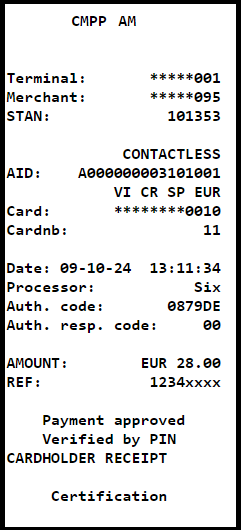
The PRINT_COMMAND contains all the necessary data for generating receipts, including the required tags and their corresponding values. This information can be used by the terminal to either print a physical receipt or display the relevant details.
It is strongly recommended to use this message for the creation of the receipt. The table below lists the tags to be included for the creation of the receipt.
| Tag Name | Tag | M/O/C |
|---|---|---|
| Command identifier | 5FE000 | M |
| Authorisation code | 89 | M |
| Language preference | 5F2D | M |
| Merchant name and location | 9F4E | M |
| Receipt footer | 5FE501 | M |
| Terminal identification | 9F1C | M |
| Merchant identifier | 9F16 | M |
| Receipt Merchant Language | 5FE509 | M |
| Transaction options | 5FE304 | M |
| Merchant order reference | 5FE341 | M |
| App preferred name | 9F12 | M |
| PAN masked | 5FE314 | M |
| Point of service entry mode | 9F39 | M |
| Authorisation response code | 8A | M |
| Transaction date | 9A | M |
| Transaction time | 9F21 | M |
| Transaction identifier | 5FE300 | M |
| CM transaction type | 5FE303 | M |
| Transaction status | 5FE305 | M |
| Processor name | 5FE333 | M |
| Cvm results | 9F34 | C1 |
| Terminal Verification Results | 95 | C1 |
| Transaction sequence counter | 9f41 | M |
| Amount entry | 7FE320 | M |
| > Amount display string | 5FE321 | M |
| > Transaction currency code | 5F2A | M |
| > Transaction currency exp | 5F36 | M |
| > Amount authorised binary | 81 | M |
| Transaction succeeded | 5fe30a | M |
| Formatted receipts | 7fe506 | M |
| > Receipt formatted lines | 7fe505 | M |
| >> Receipt formatted line | 5fe505 | M |
| Receipt duplicated | 5FE502 | M |
| AID card | 4F | C1 |
| PAN sequence number | 5F34 | C1 |
| Card sequence number | 5FE309 | C1 |
| Issuer Identification Number | 42 | C2 |
PrintCommand
Note
C1 - Present if it was in the AUTHORIZATION_REQUEST.
C2 - Present if the transaction was done via magnetic stripe.
-
Special notes for the header and footer:
-
The receipt header must always include the merchant name (or merchant ‘doing business as name’), city, state/province and country.
-
Receipt header length: The maximum accepted is 64 characters.
-
Receipt footer length: The maximum accepted is 64 characters.
-
-
Remarks
-
The
Transaction status 5FE305can take the following values: Transaction Status Values. -
Transaction Options 5FE304values Transaction Options.
-