Resources
The MerchantAPI provides various resources for the customer to use.
Listing Stores
The MerchantAPI allows customers to retrieve a listing of their registered stores. Should the customer have registered stores across different merchants, all the stores of all their merchants will be shown via this request.
Format
GET /stores
Supports Pagination
Listing Terminals
The MerchantAPI allows customers to retrieve a listing of their registered terminals. Should the customer have registered terminals across multiple stores, all their terminals, across all stores will be shown via this request.
Format
GET /terminals
Supports Pagination
Listing Stores and Terminals
The MerchantAPI allows customers to retrieve a listing of their registered stores, including the terminals associated with each store. Should the customer have registered stores across different merchants, all the stores of all their merchants will be shown via this request.
Format
GET /stores/devices
Supports Pagination
Receipt note
The Merchant API returns a plain text EFT receipt for any transaction for which a receipt is applicable. Per the card schemes regulations, a receipt should always be available for cardholders/customers. All the mandatory information required on the receipt from a transaction point of view will be included in the plain text receipt. In addition to this information, integrators are required to make available to their cardholders/customers a description and the price of each product and service purchased or returned, including applicable taxes, in detail sufficient to identify the transaction.
Transaction related endpoints
All transactions within the CM.com POS Payment Solution are related to a terminal. Therefore, within the MerchantAPI all requests related to transactions require some identifiers of the target terminal. Within the CM.com POS Payment Solution terminals are identified by their manufacturer, model and serial number. The customer is responsible for selecting the proper values for manufacturer, model and serial to target the proper terminal.
Finding the identifiers.
There are various ways to obtain the manufacturer, model and serial for a device.
Read from the menu of the Terminal App
The easiest way is getting the information from the hamburger menu of the terminal app: System report → Device serial number (or using the Sunmi device: Settings→About device→Serial number)
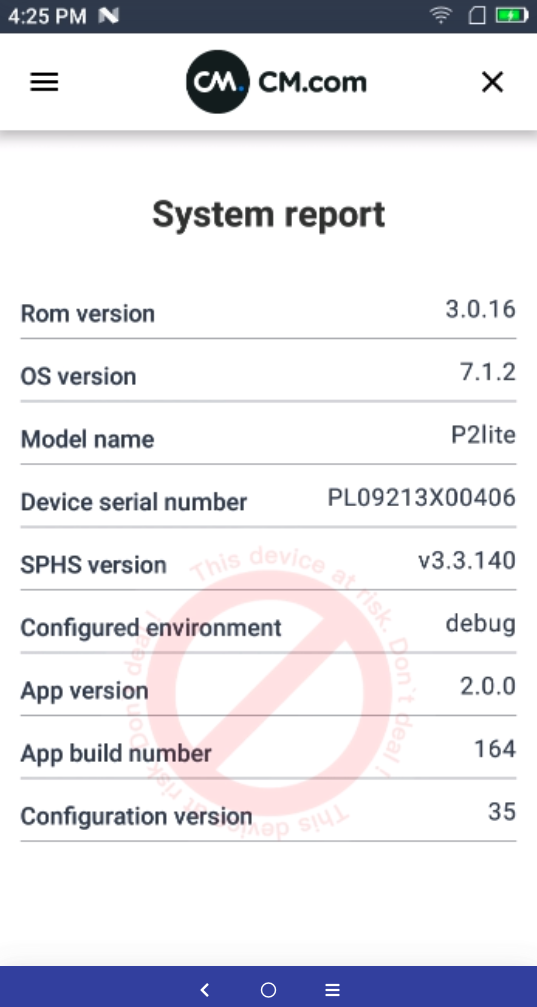
A Sales representative could enter these values in their Customer System for a sale to delegate the transaction to that terminal.
Read from the QR Code of the Terminal App
If the Customer System has the capability to scan QR code, the manual entry of the identifiers could be circumvented, since the Terminal App has the ability to display a QR-code, which contains the serial information.
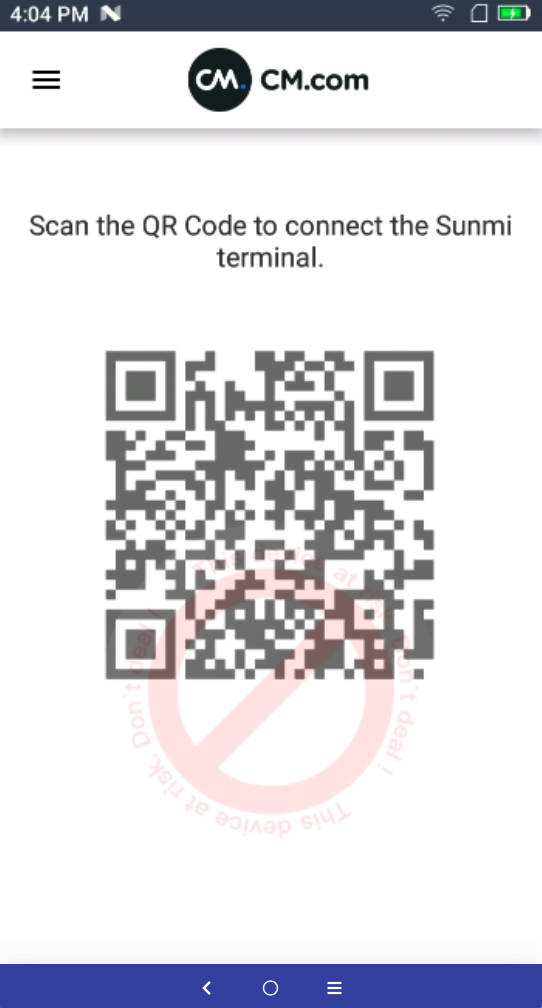
Example of data encoded in the QR code
{
  "manufacturer":"SUNMI",
  "model":"P2lite",
  "serial":"PL09214300501"
}
Read from the Serialnumber from the device.
The info can be derived from the device itself as well, but that will require taking out the battery (which we do not recommend).
Listing Transactions per terminal
The MerchantAPI allows customers to retrieve a listing of their registered transactions per terminal.
Format
GET /terminals/{manufacturer}-{model}-{serial}/transactions
Example
GET /terminals/SUNMI-P2lite-PL0919CQ00305/transactions
Supports pagination
Initiating a payment
After identifying the target terminal for a transaction the Customer System will need to POST a message to the MerchantAPI of the CM.com POS Payment Solution.
Format
POST /terminals/{manufacturer}-{model}-{serial}/transactions
The message needs to contain the following: the amount, currency and
merchantReferenceCode
The MerchantAPI will make sure only one payment is available for a terminal to processed. The Customer System may send two consecutive messages for payment A and payment B for the same terminal. If payment A has not been retrieved by the terminal when sending payment B the MerchantAPI will abort payment A, and the terminal will receive payment B.
Transaction Request
The actual message needs to be sent as JSON. Detailed information about the fields can be found in the OpenAPI specification.
Example
{
    "type": "PURCHASE",
    "merchant_order_reference": "inv2112280004",
    "amount": {
        "value": 98.75,
        "currency": "EUR"
    }
}
Transaction Response
In response to the initiated transaction the CM.com POS Payment Solution will generate an identifier and will send the information back including the status on the transaction. Initially the transaction will only contain a small set of relevant fields.
Example
{
    "type": "PURCHASE",
    "id": "5456485215432746823746654987115",
    "merchant_order_reference": "inv2112280004",
    "creation_datetime": "2022-01-18T14:30:05.619Z",
    "amount": {
        "value": 98.75,
        "currency": "EUR"
    },
    "status": "CREATED"
}
The important value is available in the field id, since the Customer
System needs that identifier further on to retrieve updates in the
status.
Initiate a refund
A customer can initiate a refund in a similar manner as a purchase. In
the message the customer must supply the id of the original purchase
which is being refunded as a reference.
Example of a refund
{
    "type": "REFUND",
    "merchant_order_reference": "invoice-202112280004-r",
    "amount": {
        "value": 98.75,
        "currency": "EUR"
    },
    "reference": {
        "id": "5456485215432746823746654987115"
    }
}
Initiate a Card Not Present (CNP) Refund
A customer can initiate a Card Not Present (CNP) refund in a manner similar to a (card present) refund. The main difference is that for a CNP refund, the cardholder's physical card is not required to perform the refund.
CNP refunds are referenced refunds, meaning they are tied to the original purchase and processed as e-commerce transactions.
The period during which a CNP refund can be requested and accepted is 90 days from the date of the original transaction.
In the url the customer must include the transaction ID of the original purchase that they wish to refund. The merchant API will use this information to derive the card that the refund will be sent to.
CNP Refund Request
Format
POST /cnp/transactions/{transactionId}/refunds
The message needs to contain the following: the amount, currency and merchantReferenceCode.
Example of a CNP refund request
{
    "merchant_order_reference": "merchant-reference",
      "amount": {
        "value": 10.00,
        "currency": "EUR"
        }
 }
CNP Refund Response
The CNP refund response body will contain the transactionId and the status of the refund.
Example of a CNP refund response
{
    "transactionId": "0001012025082213432025400000000",
    "status": "SUCCESS"
}
Multiple Refunds
For the purpose of allowing refunds for more than one item from a specific purchase, you will be able to perform multiple refunds on an original or referenced purchase. However, this succession of refunds cannot exceed the original purchase amount, and the refunded amount is tracked for this purpose.
Getting the status of a CNP refund
A customer can retrieve information about the status of a CNP refund transaction. In the url the customer must include the transaction ID of the CNP refund they wish to request the status of. The customer already has this ID as the CNP transaction ID is returned in the response after a CNP refund is created.
Format
GET /cnp/transactions/{cnpTransactionId}
Example of CNP refund status response
{
    "merchant_order_reference": "CNP refund",
    "amount": {
        "value": 30.00,
        "currency": "EUR"
    },
    "store": {
        "uuid": "d9188251-35ab-4493-ae96-ecd35efde123",
        "name": "Store name"
    },
    "id": "0001012025100522084879100001873",
    "system_trace_audit_number": "100123",
    "brand": "MASTERCARD",
    "receipt": "         Hello          \n\nTerminal:               \nMerchant:       *****916\nSTAN:             100123\n\n             CONTACTLESS\nAID:          A000000004\n              MasterCard\nKaart:      ********0036\nKaartnr:               1\n\nDatum:05-10-25  22:08:48\nProcessor:        CM.com\nAuth. code:       382524\nAuth. resp. code:     00\n\nBEDRAG:        EUR 30,00\nREF:          CNP refund\n\n    CNP_REFU akkoord    \n\nKAARTHOUDER BON         \n\n          Bye           ",
    "result": "APPROVED",
    "status": "CLEARED",
    "creation_datetime": "2025-10-05T20:08:48Z",
    "merchant_id": "55835681-a210-40d9-9fbf-546c5c6dc431",
    "processor_terminal_id": "00000001",
    "type": "CNP_REFUND",
    "authorization_code": "382511"
}
The customer can also retrieve the status information of all CNP refund transactions for the last 90 days for their organization.
Format
GET /cnp/transactions
Supports Pagination
Example of status for all CNP refund transactions
[
    {
        "merchant_order_reference": "CNP refund",
        "amount": {
            "value": 20.00,
            "currency": "EUR"
        },
        "store": {
            "uuid": "d9188251-35ab-4493-ae96-ecd35efde123",
            "name": "Store name"
        },
        "id": "0001012025100700262821900008762",
        "system_trace_audit_number": "100018",
        "brand": "MASTERCARD",
        "receipt": "         Hello          \n\nTerminal:               \nMerchant:       *****916\nSTAN:             100018\n\n             CONTACTLESS\nAID:          A000000004\n              MasterCard\nKaart:      ********0036\nKaartnr:               1\n\nDatum:07-10-25  00:26:28\nProcessor:        CM.com\nAuth. code:       466407\nAuth. resp. code:     00\n\nBEDRAG:        EUR 20,00\nREF:          CNP refund\n\n    CNP_REFU akkoord    \n\nKAARTHOUDER BON         \n\n          Bye           ",
        "result": "APPROVED",
        "status": "CLEARED",
        "creation_datetime": "2025-10-06T22:26:28Z",
        "merchant_id": "55835681-a210-40d9-9fbf-546c5c6dc121",
        "processor_terminal_id": "00000001",
        "type": "CNP_REFUND",
        "authorization_code": "466407"
    },
    {
        "merchant_order_reference": "CNP refund",
        "amount": {
            "value": 30.00,
            "currency": "EUR"
        },
        "store": {
            "uuid": "d9188251-35ab-4493-ae96-ecd35efde123",
            "name": "Store name"
        },
        "id": "0001012025100522290240300004761",
        "system_trace_audit_number": "null",
        "brand": "MASTERCARD",
        "result": "DECLINED",
        "status": "CANCELLED",
        "creation_datetime": "2025-10-05T20:29:02Z",
        "merchant_id": "55835681-a210-40d9-9fbf-546c5c6dc121",
        "processor_terminal_id": "00000001",
        "type": "CNP_REFUND"
    }
]
Getting the day totals of CNP refunds
A customer can retrieve the day totals receipt of CNP refund transactions for their organization. The day totals receipt contains the total sum of CNP refund transactions from midnight (00:00) of the current day by default. Optionally, the customer can specify a start time to filter transactions from a specific hour and minute of the current day.
Format
GET /cnp/transactions/daytotals/today
Example of CNP day totals receipt response
{
    "receipt": "CNP_REFUNDS DAY TOTALS         \n\n31-10-2025                      10:27:53\n\nPeriod number                   2025.304\n\nPeriod start        31-10-2025  00:00:00\nPeriod end          31-10-2025  10:27:53\n\nEUR / CNP Refund                        \nCard type          Count          Amount\n========================================\nCREDIT VISA            2           19.00\n----------------------------------------\nTotal                  2 EUR       19.00\n========================================\n\nGrand Total              EUR       19.00\n========================================\n\n\n             END OF REPORT "
}
To specify a different starting time add the query parameters hourFrom and minuteFrom. The below example will request day totals from 03:14 in the morning until current time.
Format
GET /cnp/transactions/daytotals/today?hourFrom=03&minuteFrom=14
Getting the status of a transaction
If the Customer System wants to get information about the status of a transaction, it can ask the MerchantAPI for that. In order to do so it needs to send an HTTP GET to a specific endpoint.
Format
GET /terminals/{manufacturer}-{model}-{serial}/transactions/{id}
Example
GET /terminals/SUNMI-P2Lite-PL0919CQ00305/transactions/5456485215432746823746
Initially the data will be the same as the response to the POST, which created the transaction.
Example
{
    "type": "PURCHASE",
    "id": "5456485215432746823746654987115",
    "merchant_order_reference": "inv2112280004",
    "creation_datetime": "2022-01-18T14:30:05.619Z",
    "amount": {
        "value": 98.75,
        "currency": "EUR"
    },
    "status": "CREATED"
}
After the consumer has provided their bankcard and the transaction has been processed, the response will contain more data.
Example
{
    "merchant_order_reference": "inv2112280004",
    "amount": {
        "value": 98.75,
        "currency": "EUR"
    },
    "id": "5456485215432746823746654987115",
    "creation_datetime": "2022-01-18T14:30:05.619Z",
    "transaction_datetime": "2022-01-18T14:31:02Z",
    "system_trace_audit_number": "155890",
    "brand": "V_PAY",
    "receipt": "     CARDHOLDER NAME      \n....\nPAYMENT ACCEPTED    \n\n..... ",
    "merchant_receipt": "     MERCHANT NAME      \n....\nPAYMENT ACCEPTED    \n\n..... ",
    "result": "APPROVED",
    "status": "CLEARED",
    "type": "PURCHASE",
    "store": {
        "uuid": "3fa85f64-5717-4562-b3fc-2c963f66afa6",
        "name": "The configured Shopname"
    }
}
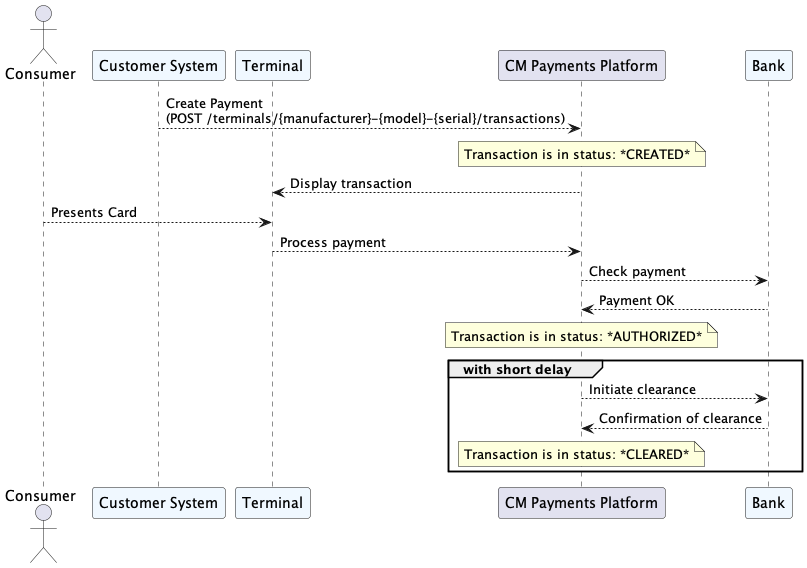
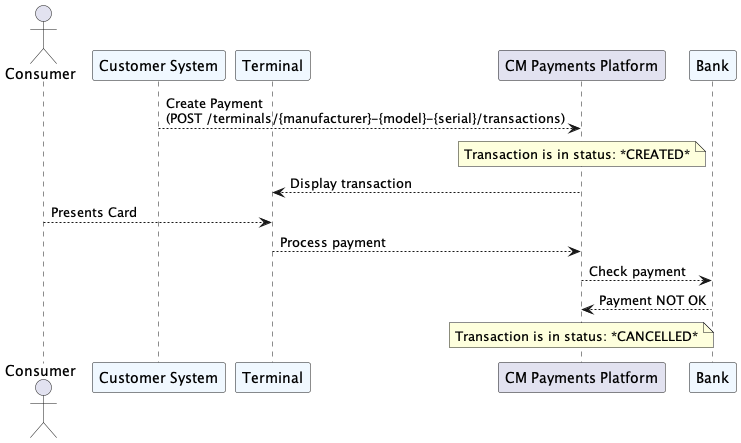
Statuses and result of a Transaction
A transaction can have the following statuses:
| CREATED | Transaction is created and waiting authorization. |
| AUTHORIZED | Transaction is authorized by the Acquirer and awaiting clearance. |
| CLEARED | Transaction is cleared and is completed successfully. This status indicates that the transaction will be settled by the Acquirer to the merchant. |
| CANCELLED | Transaction is cancelled and is completed unsuccessfully |
A transaction can have the following result values:
| APPROVED | Indicates that the bank of the consumer authorized the payment. |
| DECLINED | Indicates that the bank of the consumer does NOT approve the payment. |
Flow for a Successful transaction through the statuses
Flow for a declined transaction through the statusses
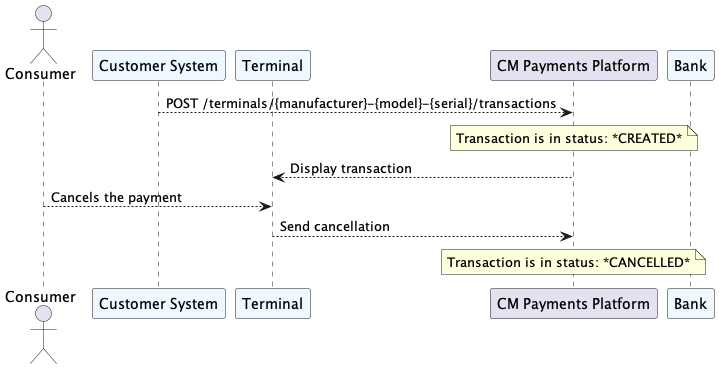
Flow for a transaction where the Consumer cancels
Cancel a transaction
If the Customer System wants to cancel a transaction, before it is handled by a terminal (it has the CREATED status), it can instruct the MerchantAPI to do so. In order to do so, it needs to send an HTTP DELETE request to a specific endpoint, identifying the transaction.
Important: Please note that CNP (Card Not Present) refunds cannot be cancelled. Once a CNP refund is initiated, it is processed immediately and cannot be reversed or stopped.
Format
DELETE /terminals/{manufacturer}-{model}-{serial}/transactions/{id}
Example
DELETE /terminals/SUNMI-P2Lite-PL0919CQ00305/transactions/5456485215432746823746
When the transaction is still in a state to be cancelled a response with
HTTP status 204 will be the result. If the transaction is already in a
state, where it can not be cancelled anymore (because a card has been
presented on the terminal), then a HTTP status 409 Conflict will be
the result.
Retrieve day totals per terminal
The MerchantAPI allows customers to retrieve the day totals of their registered transactions per terminal. The day totals will be presented as a formatted receipt.
Format
GET /terminals/{manufacturer}-{model}-{serial}/daytotals/today
Example
GET /terminals/SUNMI-P2lite-PL0919CQ00305/daytotals/today