Template messages
WhatsApp only allows businesses to message users outside the customer service window with pre-approved templates. This page explains how to send a template, how to fill in its variables, and the options for each template type.
| Template type | Category | Use it to… |
|---|---|---|
| Text and media templates | Any | Send text with an optional image, video, document or GIF header. |
| Interactive templates | Utility, Marketing | Add quick-reply and URL buttons. |
| Authentication templates | Authentication | Send one-time passwords and verification codes. |
| Location templates | Utility, Marketing | Share a location as a map pin. |
| Flows templates | Utility, Marketing | Open a WhatsApp Flow. |
| Carousel templates | Marketing | Show up to 10 scrollable media cards. |
| Limited-time offer templates | Marketing | Show an offer code with an expiry countdown. |
| Coupon code templates | Marketing | Show an offer code the user can copy. |
| Call permission request templates | Marketing | Ask for permission to call the user. |
Order details templates for payments are described in Payments – India and Payments – Brazil.
Before you begin
Create and approve the template
Templates must be created and approved before you can send them. Request templates through the Channels portal. Once a template is approved, open its Details in the template overview to find the template name, which you use as element_name.
Obtain opt-in
Users must have actively opted in to the type of messages you send. An active opt-in is triggered by a deliberate user action, such as entering their phone number in a WhatsApp field or ticking a consent box.
When you collect opt-ins, you must:
- State clearly that the user is opting in to receive WhatsApp messages from your business.
- Name your business explicitly.
- Make clear which types of message the user will receive, for example order updates or promotions.
- Offer a straightforward way to opt out, and honour opt-out requests.
- Comply with all applicable local laws and regulations.
Accepted opt-in channels include SMS, your website, a WhatsApp conversation, an IVR flow and in-person or paper sign-up.
Meta monitors the quality of your messages. If users frequently block or report your business, Meta limits your messaging. Monitor your quality rating closely when you introduce new opt-in flows or message types.
Template object
Add a template item to richContent.conversation. The template.whatsapp object corresponds to the template object in Meta's documentation.
{
  "messages": {
    "authentication": {
      "productToken": "YOUR_PRODUCT_TOKEN"
    },
    "msg": [
      {
        "from": "00316098765432",
        "to": [
          { "number": "00316012345678" }
        ],
        "body": {
          "type": "auto",
          "content": "Fallback text"
        },
        "allowedChannels": ["WhatsApp"],
        "richContent": {
          "conversation": [
            {
              "template": {
                "whatsapp": {
                  "element_name": "order_confirmation",
                  "language": {
                    "policy": "deterministic",
                    "code": "en"
                  },
                  "components": [
                    {
                      "type": "body",
                      "parameters": [
                        { "type": "text", "text": "John" },
                        { "type": "text", "text": "ORD-12345" }
                      ]
                    }
                  ]
                }
              }
            }
          ]
        }
      }
    ]
  }
}
The other examples on this page show only the template item.
| Field | Required | Description |
|---|---|---|
element_name | Yes | Name of the approved template. |
language | Yes | Language of the template. See Language. |
components | Yes | Values for the template's variables, grouped by component. The number of parameters must exactly match the number of variables in the template. Use an empty array if the template has no variables. |
Language
A template can exist in several languages. Specify which one to send.
| Field | Required | Description |
|---|---|---|
policy | Yes | Always deterministic: the template is delivered in exactly the language and locale you specify. |
code | Yes | Language or locale code, for example en or en_US. See Meta's supported languages. |
Components
| Component | Description |
|---|---|
header | Optional. text, media (image, video, document or gif) or location. |
body | Required. The main message text. Supports variables. |
footer | Optional. Static text below the body. Not supported in limited-time offer and coupon code templates. |
button | Optional. Sub-types quick_reply, url, copy_code and flow. Identify each button by its zero-based index. |
limited_time_offer | Limited-time offer templates only. Sets the offer expiry. |
carousel | Carousel templates only. Contains the cards. |
Parameter types
Use these types in components[].parameters[]:
| Type | Used in | Description |
|---|---|---|
text | Header, body, buttons | Plain text value. Cannot be empty. |
currency | Body | Localised amount. Requires fallback_value, code (ISO 4217) and amount_1000 (the amount multiplied by 1,000). |
date_time | Body | Localised date and time. Requires fallback_value. Accepts either day_of_week, year, month, day_of_month, hour, minute and calendar (GREGORIAN or SOLAR_HIJRI) or a UNIX timestamp. |
image, video, document | Header | Media header. Contains a media object (mediaName, mediaUri, mimeType). |
location | Header | Location header. See Location templates. |
payload | quick_reply button | Value returned in the MO webhook when the user taps the button. Max. 128 characters. |
coupon_code | copy_code button | Offer code. Max. 20 characters. |
action | flow button | Contains flow_token and optional flow_action_data. |
text parameters cannot be empty, and cannot contain newlines (\n), tabs (\t), carriage returns (\r) or more than four consecutive spaces. Requests that break these rules are rejected.
Categories
Every template is assigned a category when it is created. The category affects delivery rules, pricing and opt-in requirements.
| Category | Typical use |
|---|---|
AUTHENTICATION | Verifying a user's identity: one-time passwords, verification codes and login confirmations. |
UTILITY | Following up on a user action or request: order confirmations, delivery updates and account alerts. |
MARKETING | Promotions, offers, product announcements and re-engagement. |
Templates in the wrong category can be rejected or removed. See Meta's categorisation guidelines.
Text and media templates
The basic template contains a body with variables, and optionally a header and footer. The header can contain text or media: image, video, document or gif.
GIF headers are supported only in the Marketing Messages API. The GIF must be an MP4 file of max. 3.5 MB, larger files are shown as a video.
{
  "template": {
    "whatsapp": {
      "element_name": "TEMPLATE_NAME",
      "language": { "policy": "deterministic", "code": "en" },
      "components": [
        {
          "type": "body",
          "parameters": [
            { "type": "text", "text": "John" },
            {
              "type": "currency",
              "currency": {
                "fallback_value": "€100.99",
                "code": "EUR",
                "amount_1000": 100990
              }
            },
            {
              "type": "date_time",
              "date_time": {
                "fallback_value": "25 February 1977",
                "day_of_week": 5,
                "day_of_month": 25,
                "year": 1977,
                "month": 2,
                "hour": 15,
                "minute": 33
              }
            },
            {
              "type": "date_time",
              "date_time": {
                "fallback_value": "27 January 2017",
                "timestamp": 1485470276
              }
            }
          ]
        }
      ]
    }
  }
}
{
  "template": {
    "whatsapp": {
      "element_name": "TEMPLATE_NAME",
      "language": { "policy": "deterministic", "code": "en" },
      "components": [
        {
          "type": "header",
          "parameters": [
            {
              "type": "image",
              "media": {
                "mediaName": "conversational-commerce",
                "mediaUri": "https://www.cm.com/cdn/web/nl-nl/blog/conversational-commerce.jpg",
                "mimeType": "image/jpeg"
              }
            }
          ]
        },
        {
          "type": "body",
          "parameters": [
            { "type": "text", "text": "replace-value-1" }
          ]
        }
      ]
    }
  }
}
{
  "template": {
    "whatsapp": {
      "element_name": "TEMPLATE_NAME",
      "language": { "policy": "deterministic", "code": "en" },
      "components": [
        {
          "type": "header",
          "parameters": [
            {
              "type": "document",
              "media": {
                "mediaName": "terms-and-conditions.pdf",
                "mediaUri": "https://www.example.com/documents/terms-and-conditions.pdf",
                "mimeType": "application/pdf"
              }
            }
          ]
        },
        {
          "type": "body",
          "parameters": [
            { "type": "text", "text": "replace-value-1" }
          ]
        }
      ]
    }
  }
}
Interactive templates
Interactive templates add button components to a text or media template. The button labels, the URL or call-to-action buttons (CTA) are defined when you create the template. When sending, you only provide the variable parts.
| Button sub-type | What you provide |
|---|---|
quick_reply | A payload (max. 128 characters). It is returned when the user taps the button. See Interactive template replies. |
url | For a dynamic URL, a text parameter with the URL suffix. Static URLs and phone number buttons need no parameters. |
{
  "template": {
    "whatsapp": {
      "element_name": "TEMPLATE_NAME",
      "language": { "policy": "deterministic", "code": "en" },
      "components": [
        {
          "type": "body",
          "parameters": [
            { "type": "text", "text": "your-text-string" }
          ]
        },
        {
          "type": "button",
          "sub_type": "quick_reply",
          "index": "0",
          "parameters": [
            { "type": "payload", "payload": "confirm-appointment-9rwn" }
          ]
        },
        {
          "type": "button",
          "sub_type": "url",
          "index": "1",
          "parameters": [
            { "type": "text", "text": "9rwn" }
          ]
        },
        {
          "type": "button",
          "sub_type": "url",
          "index": "2",
          "parameters": [
            { "type": "text", "text": "ticket.pdf" }
          ]
        }
      ]
    }
  }
}
Authentication templates
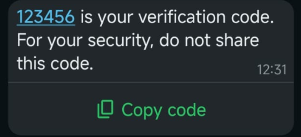
Authentication templates deliver one-time passwords and verification codes. Pass the code as the body parameter. Gor templates with a button, pass the code as the button parameter as well.
Authentication templates cannot be sent to Business-scoped User IDs. Use the user's phone number.
| Button type | Behaviour |
|---|---|
| Copy code | The user taps the button, the code is copied to their clipboard, and they paste it into your app. |
| One-tap autofill | The user taps the button and WhatsApp passes the code to your Android app. Requires changes to your app. On iOS 26 and later, the keyboard suggests the code without any integration. |
| Zero-tap | WhatsApp passes the code to your Android app via a broadcast receiver, without the user leaving your app. |
{
  "template": {
    "whatsapp": {
      "element_name": "your-template-name",
      "language": { "policy": "deterministic", "code": "en" },
      "components": [
        {
          "type": "body",
          "parameters": [
            { "type": "text", "text": "123456" }
          ]
        },
        {
          "type": "button",
          "sub_type": "url",
          "index": "0",
          "parameters": [
            { "type": "text", "text": "123456" }
          ]
        }
      ]
    }
  }
}
{
  "template": {
    "whatsapp": {
      "element_name": "your-template-name",
      "language": { "policy": "deterministic", "code": "en" },
      "components": [
        {
          "type": "body",
          "parameters": [
            { "type": "text", "text": "123456" }
          ]
        },
        {
          "type": "button",
          "sub_type": "url",
          "index": "0",
          "parameters": [
            { "type": "text", "text": "123456" }
          ]
        }
      ]
    }
  }
}
{
  "template": {
    "whatsapp": {
      "element_name": "your-template-name",
      "language": { "policy": "deterministic", "code": "en" },
      "components": [
        {
          "type": "body",
          "parameters": [
            { "type": "text", "text": "123456" }
          ]
        }
      ]
    }
  }
}
Authentication messages are only shown on the user's primary WhatsApp device. On linked devices such as WhatsApp Web or desktop, the message is masked and the user is asked to view it on their primary device. This is enabled by default and requires no configuration.
Set a time-to-live equal to or shorter than your code's validity, so users do not receive expired codes.
Location templates
A location template shares a location, such as a store, venue or pickup point, as a map pin in the header.
Location templates are available in the Marketing and Utility categories. Choose the category that matches the context: a store address in a promotion is Marketing, a drop-off point for an order the user placed is Utility.
| Field | Required | Description |
|---|---|---|
latitude | Yes | Latitude in decimal degrees. |
longitude | Yes | Longitude in decimal degrees. |
name | No | Name of the location, for example a store. |
address | No | Address of the location. |
{
  "template": {
    "whatsapp": {
      "element_name": "your-template-name",
      "language": { "policy": "deterministic", "code": "en" },
      "components": [
        {
          "type": "header",
          "parameters": [
            {
              "type": "location",
              "location": {
                "latitude": "51.603802",
                "longitude": "4.770821",
                "name": "CM.com HQ",
                "address": "Konijnenberg 30, 4825 BD Breda"
              }
            }
          ]
        },
        {
          "type": "body",
          "parameters": [
            { "type": "text", "text": "your-text-string" }
          ]
        }
      ]
    }
  }
}
Flows templates
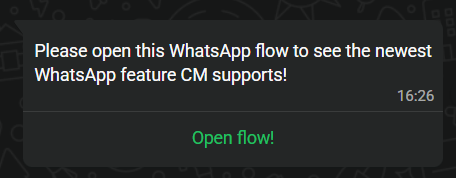
A Flows template contains a button that opens a WhatsApp Flow. The data the user submits is delivered to your MO webhook as a Flows reply.
| Field | Required | Description |
|---|---|---|
action.flow_token | No | Your own token. It is returned in the Flows reply so you can correlate the response. |
action.flow_action_data | No | Initial data passed to the first screen of the Flow. |
{
  "template": {
    "whatsapp": {
      "element_name": "your-template-name",
      "language": { "policy": "deterministic", "code": "en" },
      "components": [
        {
          "type": "button",
          "sub_type": "flow",
          "index": "0",
          "parameters": [
            {
              "type": "action",
              "action": {
                "flow_token": "your-flow-token",
                "flow_action_data": {}
              }
            }
          ]
        }
      ]
    }
  }
}
Carousel templates
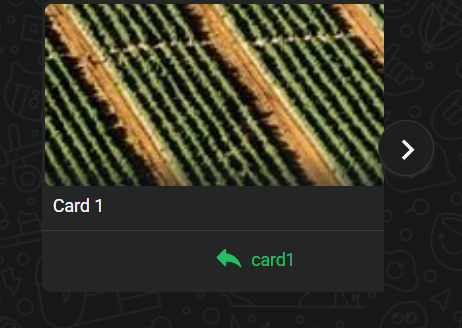
A carousel template is a Marketing template with up to 10 media cards in a horizontally scrollable format. Each card has its own image or video header, body and buttons.
| Field | Required | Description |
|---|---|---|
cards[].card_index | Yes | Position of the card, starting at 0. |
cards[].components | Yes | The card's HEADER, BODY and BUTTON components. |
HEADER parameter image.mediaUri | Yes | Public URL of the card image. |
BUTTON parameter payload | Yes* | *For quick-reply buttons: the payload returned when tapped. |
{
  "template": {
    "whatsapp": {
      "element_name": "your-template-name",
      "language": { "policy": "deterministic", "code": "en" },
      "components": [
        {
          "type": "BODY",
          "parameters": []
        },
        {
          "type": "CAROUSEL",
          "cards": [
            {
              "card_index": 0,
              "components": [
                {
                  "type": "HEADER",
                  "parameters": [
                    {
                      "type": "IMAGE",
                      "image": {
                        "mediaUri": "https://cmcom.s3.eu-west-3.amazonaws.com/webimage-C0D8E5EE-2ABC-41F2-B3E694BF22A1D6C6.png"
                      }
                    }
                  ]
                },
                {
                  "type": "BODY",
                  "parameters": []
                },
                {
                  "type": "BUTTON",
                  "sub_type": "QUICK_REPLY",
                  "index": 0,
                  "parameters": [
                    { "type": "PAYLOAD", "payload": "card-0-interested" }
                  ]
                }
              ]
            },
            {
              "card_index": 1,
              "components": [
                {
                  "type": "HEADER",
                  "parameters": [
                    {
                      "type": "IMAGE",
                      "image": {
                        "mediaUri": "https://cmcom.s3.eu-west-3.amazonaws.com/webimage-4C0C8462-0F93-41AC-A66F3D614E53DFA5.png"
                      }
                    }
                  ]
                },
                {
                  "type": "BODY",
                  "parameters": []
                },
                {
                  "type": "BUTTON",
                  "sub_type": "QUICK_REPLY",
                  "index": 0,
                  "parameters": [
                    { "type": "PAYLOAD", "payload": "card-1-interested" }
                  ]
                }
              ]
            }
          ]
        }
      ]
    }
  }
}
Limited-time offer templates
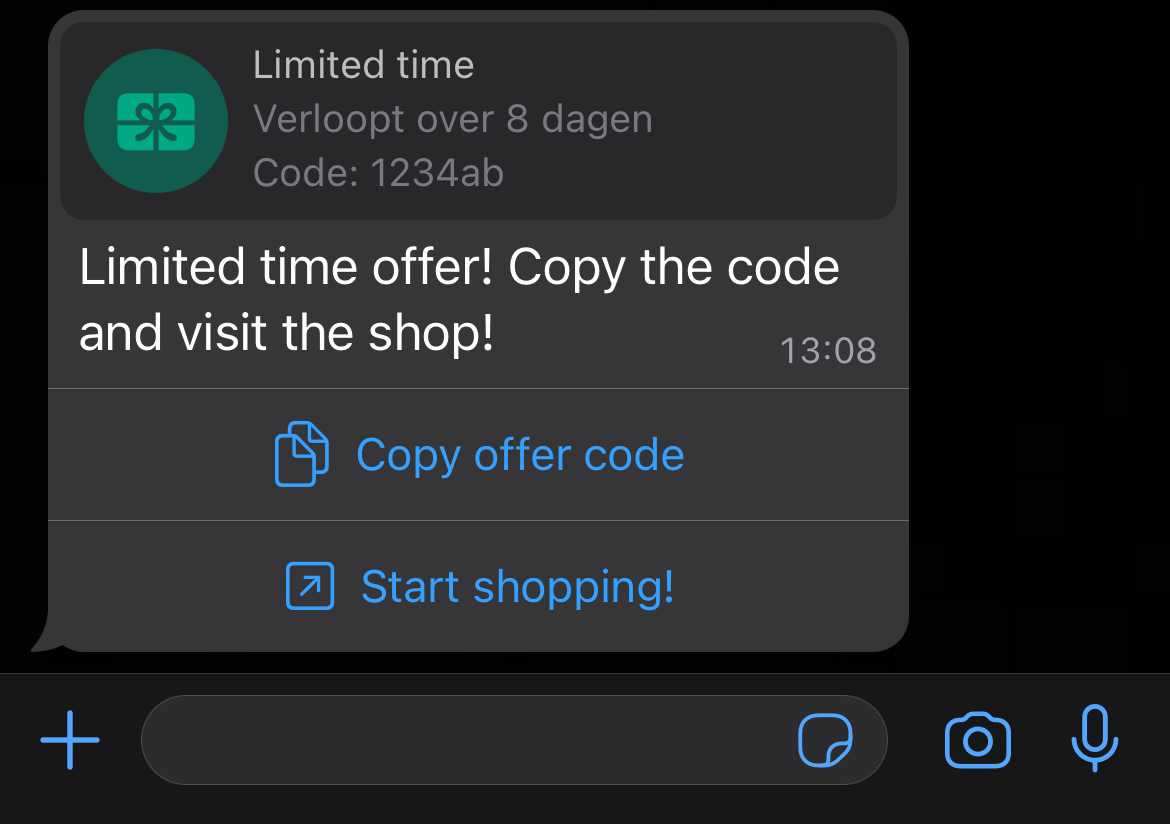
A limited-time offer (LTO) template is a Marketing template that shows an offer code with an expiry date and countdown timer.
| Field | Required | Description |
|---|---|---|
limited_time_offer.expiration_time_ms | Yes | Expiry of the offer as a UNIX timestamp in milliseconds. |
coupon_code | Yes | Offer code. Max. 20 characters. |
{
  "template": {
    "whatsapp": {
      "element_name": "your-template-name",
      "language": { "policy": "deterministic", "code": "en_US" },
      "components": [
        {
          "type": "body",
          "parameters": []
        },
        {
          "type": "limited_time_offer",
          "parameters": [
            {
              "type": "limited_time_offer",
              "limited_time_offer": {
                "expiration_time_ms": 1798761600000
              }
            }
          ]
        },
        {
          "type": "button",
          "sub_type": "copy_code",
          "index": 0,
          "parameters": [
            { "type": "coupon_code", "coupon_code": "1234ab" }
          ]
        }
      ]
    }
  }
}
Coupon code templates
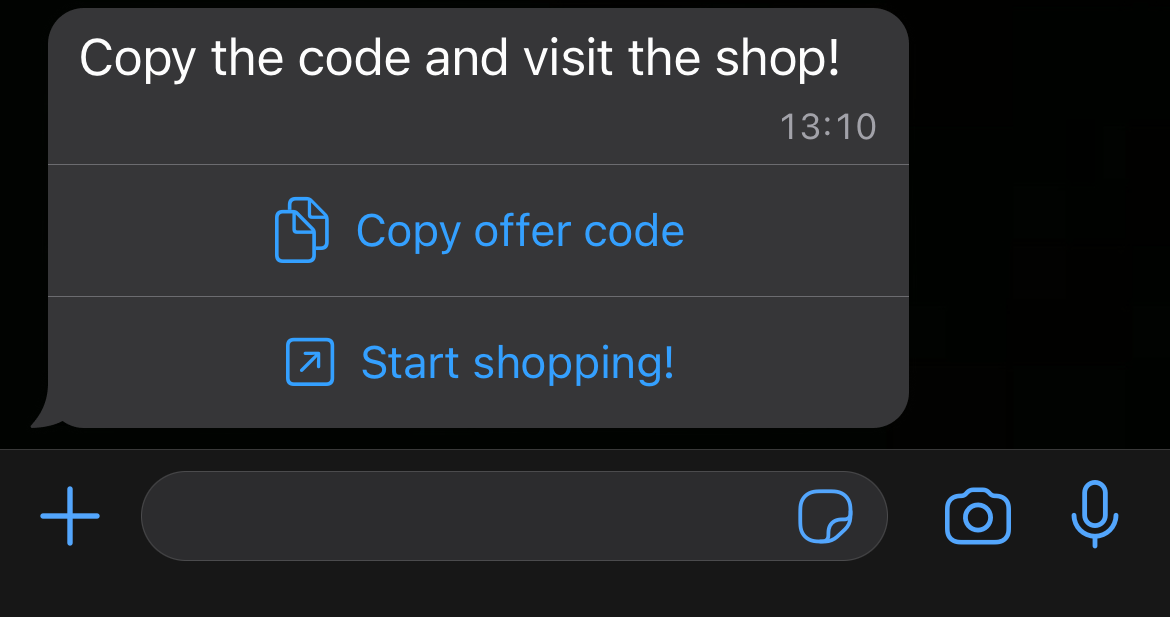
A coupon code template is a Marketing template with a button that copies an offer code to the user's clipboard. Unlike a limited-time offer, it has no expiry. It can include an image header.
| Field | Required | Description |
|---|---|---|
coupon_code | Yes | Offer code. Max. 20 characters. |
{
  "template": {
    "whatsapp": {
      "element_name": "your-template-name",
      "language": { "policy": "deterministic", "code": "en_US" },
      "components": [
        {
          "type": "body",
          "parameters": []
        },
        {
          "type": "button",
          "sub_type": "copy_code",
          "index": 0,
          "parameters": [
            { "type": "coupon_code", "coupon_code": "1234ab" }
          ]
        }
      ]
    }
  }
}
- Only Marketing templates are supported.
- A template can contain only one copy code button, and its label cannot be customised.
- Footers are not supported.
- On WhatsApp Web and desktop, users do not see the offer. Instead, they see a message that their client does not support this message type.
Call permission request template
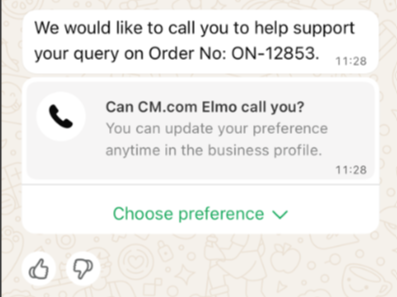
A call permission request template asks the user for permission to call them, outside the customer service window. It is a Marketing template. Unlike the interactive version, the template must include body text that explains why you want to call. You can also add a header and footer.
The limits for permissions and calls are described under Call permission request message. The user's response is delivered as a call permission reply.
{
  "template": {
    "whatsapp": {
      "element_name": "call_permission_request",
      "language": { "policy": "deterministic", "code": "en" },
      "components": [
        {
          "type": "body",
          "parameters": [
            { "type": "text", "text": "John" }
          ]
        }
      ]
    }
  }
}
{
  "template": {
    "whatsapp": {
      "element_name": "call_permission_request",
      "language": { "policy": "deterministic", "code": "en" },
      "components": [
        {
          "type": "body",
          "parameters": []
        }
      ]
    }
  }
}
Time-to-live (TTL)
The time-to-live (TTL) or validity period, is how long WhatsApp keeps trying to deliver a template message when the user's device is unreachable. Messages that are not delivered within the TTL are dropped and never reach the user.
| Category | Default TTL | Configurable range |
|---|---|---|
| Authentication | 10 minutes | 30 seconds – 15 minutes (30–900 s) |
| Utility | 30 days | 30 seconds – 12 hours (30–43,200 s) |
| Marketing | 30 days | 12 hours – 30 days (43,200–2,592,000 s) |
These templates have a default TTL of 30 days unless you update them.
If you have not received a delivered status report by the time the TTL expires, assume the message was dropped. There may be a short delay between the TTL expiring and the status report, so allow a buffer before acting on undelivered messages. Expired messages are reported with error code 83, see Standard errors.
Set the TTL of authentication templates equal to or shorter than the validity of your codes, so users never receive an expired code.