Payments India
With WhatsApp Payments in India, users can review an order and pay for it without leaving WhatsApp, using UPI apps, net banking, wallets or cards.
How it works
- The order is created. The user selects products from your WhatsApp catalogue and sends you their cart, or you create an order for products the user has shown interest in.
- You send the order details. You send an
order_detailsmessage with the items, amounts and payment options. The user reviews the order and pays. - You update the order status. When you receive the payment, and as the order progresses, you send
order_statusmessages to keep the user informed.
Before you begin
Accept the WhatsApp Payments terms
Before you create a payment configuration, accept the WhatsApp Payments Terms of Service. Until you do, sending payment messages fails with error code 131005, the error response contains the link to accept the terms.
Create a payment configuration
Your WhatsApp Business Account (WABA) must be linked to a payment configuration. Each configuration has a unique name. In the order_details message you specify which configuration to use for a checkout.
You can create a configuration in two ways.
Option 1: WhatsApp Manager (recommended)
- In WhatsApp Manager, go to Account tools → Payment configurations and select India.
- Click Add new configuration.
- Enter a configuration name, select a payment provider and complete the gateway authorisation.
Option 2: Onboarding API
Create the configuration with a request to Meta's Graph API. Two types are supported:
| Type | Use for |
|---|---|
| Payment gateway | Providers such as Razorpay, PayU or Zaakpay. |
| UPI VPA | A direct UPI handle (virtual payment address). |
curl -X POST 'https://graph.facebook.com/v21.0/{WABA_ID}/payment_configuration' \
  -H 'Authorization: Bearer {ACCESS_TOKEN}' \
  -H 'Content-Type: application/json' \
  -d '{
    "configuration_name": "my-payment-config",
    "purpose_code": "00",
    "merchant_category_code": "0000",
    "provider_name": "razorpay",
    "redirect_url": "https://your-redirect-url.com"
  }'
curl -X POST 'https://graph.facebook.com/v21.0/{WABA_ID}/payment_configuration' \
  -H 'Authorization: Bearer {ACCESS_TOKEN}' \
  -H 'Content-Type: application/json' \
  -d '{
    "configuration_name": "my-upi-config",
    "purpose_code": "00",
    "merchant_category_code": "0000",
    "provider_name": "upi_vpa",
    "merchant_vpa": "merchantname@bank"
  }'
| Field | Required | Description |
|---|---|---|
configuration_name | Yes | Unique name of the configuration. Used in order_details messages to select the configuration. |
provider_name | Yes | upi_vpa, razorpay, payu or zaakpay. |
merchant_category_code | No | Merchant category code (MCC) of your business. |
purpose_code | No | Purpose code of the transaction type. |
merchant_vpa | Conditional | Required for upi_vpa: your UPI handle. |
redirect_url | No | Where you are redirected after completing the gateway authorisation. |
For a payment gateway, the response contains an OAuth URL. Open it and complete the authorisation to connect the configuration to your gateway account.
{
  "oauth_url": "https://www.facebook.com/payment/onboarding/init/",
  "expiration": 1721687287,
  "success": true
}
The link expires at the expiration timestamp. If it expires, request a new one with Meta's Regenerate OAuth Link endpoint.
The Onboarding API also lets you list, retrieve and delete payment configurations. See Meta's Payments India onboarding APIs.
Configuration status
| Status | Meaning |
|---|---|
Needs_Connecting | The OAuth authorisation with the payment gateway is pending. |
Needs_Testing | Connected, but not yet verified with a test transaction. |
Active | Ready to process payments. |
When the configuration status changes, you receive an update on your webhook.
Send the order details
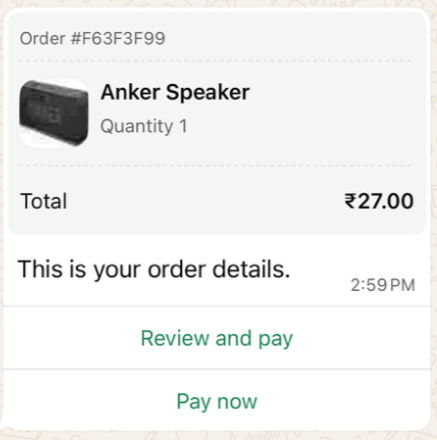
The order_details message shows the order summary and a button to pay. You can send it as an interactive message within the customer service window, or as a template outside it.
Requirements
currencymust beINR.total_amountmust equal subtotal + tax + shipping − discount.action.namemust bereview_and_pay.order.statusmust bepending.reference_idmust be unique per order.
Use a unique reference_id for every order, to avoid duplicates and to track payment status accurately. If you send several order_details messages for the same order or invoice, add a sequence number to the reference_id.
Supported payment methods
payment_settings[].type | Description |
|---|---|
upi_intent_link | UPI intent link. Supported integrations: Dynamic VPA, Cashfree, BillDesk and CCAvenue. |
payment_link | A payment link (including enhanced payment links). |
payment_gateway | A payment gateway linked through your payment configuration. |
Amounts
All amounts are objects with a value and an offset. The actual amount is value ÷ offset. The offset must be 100.
{ "value": 21000, "offset": 100 }
This represents ₹210.00.
Interactive order_details message
Fields
| Field | Required | Description |
|---|---|---|
interactive.type | Yes | order_details |
header | No | Image header. |
body.text | Yes | Message text. |
footer.text | No | Footer text. |
action.name | Yes | review_and_pay |
parameters.reference_id | Yes | Your unique order reference. |
parameters.type | Yes | digital-goods or physical-goods. |
parameters.beneficiaries | Conditional | Required for physical-goods: the recipients of the shipment. Not shown to the user, but required for legal and compliance reasons. |
parameters.currency | Yes | INR |
parameters.total_amount | Yes | Total amount. |
parameters.payment_settings | Yes | Payment method. See Supported payment methods. |
parameters.order.status | Yes | pending |
parameters.order.type | No | quick_pay: hides the Review and pay button and shows only Pay now. |
parameters.order.catalog_id | No | Your catalogue ID. See Catalogue and non-catalogue items. |
parameters.order.expiration | No | timestamp (UNIX time) and description. After this time, the pay button is disabled. |
parameters.order.items[] | Yes | The items: name, amount, quantity, and optionally sale_amount (discounted price per item) and retailer_id. |
parameters.order.subtotal | Yes | Sum of the item amounts. |
parameters.order.tax | No | Tax amount, with optional description. |
parameters.order.shipping | No | Shipping costs, with optional description. |
parameters.order.discount | No | Discount, with optional description and discount_program_name. |
Catalogue and non-catalogue items
| Items from… | Required item fields |
|---|---|
| Your catalogue | Set order.catalog_id, and retailer_id (the content ID in your catalogue) on each item. |
| Outside a catalogue | Omit catalog_id and retailer_id. Add country_of_origin, importer_name and importer_address to each item. |
Examples
{
  "messages": {
    "authentication": {
      "productToken": "YOUR_PRODUCT_TOKEN"
    },
    "msg": [
      {
        "from": "00916098765432",
        "to": [
          { "number": "00916012345678" }
        ],
        "body": {
          "type": "auto",
          "content": "Here is your order summary."
        },
        "allowedChannels": ["WhatsApp"],
        "richContent": {
          "conversation": [
            {
              "interactive": {
                "type": "order_details",
                "header": {
                  "type": "image",
                  "image": {
                    "link": "https://your-media-url.com/image.jpg"
                  }
                },
                "body": {
                  "text": "Here is your order summary. Please review and complete your payment."
                },
                "footer": {
                  "text": "Thank you for shopping with us!"
                },
                "action": {
                  "name": "review_and_pay",
                  "parameters": {
                    "reference_id": "order-ref-12345",
                    "type": "physical-goods",
                    "beneficiaries": [
                      {
                        "name": "Jane Doe",
                        "address_line1": "B8/733 Nand Nagri",
                        "address_line2": "Near Police Station",
                        "city": "East Delhi",
                        "state": "Delhi",
                        "country": "India",
                        "postal_code": "110093"
                      }
                    ],
                    "currency": "INR",
                    "total_amount": { "value": 21000, "offset": 100 },
                    "payment_settings": [
                      {
                        "type": "upi_intent_link",
                        "upi_intent_link": {
                          "link": "upi://pay?pa=merchant_vpa&pn=Merchant_Name&mc=1234&purpose=00&tr=pg_generated_id"
                        }
                      }
                    ],
                    "order": {
                      "status": "pending",
                      "type": "quick_pay",
                      "expiration": {
                        "timestamp": "1798761600",
                        "description": "Order will be cancelled after expiry."
                      },
                      "items": [
                        {
                          "name": "Cotton T-Shirt",
                          "amount": { "value": 10000, "offset": 100 },
                          "sale_amount": { "value": 8000, "offset": 100 },
                          "quantity": 2,
                          "country_of_origin": "India",
                          "importer_name": "Acme Imports Pvt Ltd",
                          "importer_address": {
                            "address_line1": "B8/733 Nand Nagri",
                            "address_line2": "Near Police Station",
                            "city": "East Delhi",
                            "zone_code": "DL",
                            "postal_code": "110093",
                            "country_code": "IN"
                          }
                        }
                      ],
                      "subtotal": { "value": 16000, "offset": 100 },
                      "tax": { "value": 2000, "offset": 100, "description": "GST" },
                      "shipping": { "value": 5000, "offset": 100, "description": "Standard delivery" },
                      "discount": {
                        "value": 2000,
                        "offset": 100,
                        "description": "Promo discount",
                        "discount_program_name": "WELCOME10"
                      }
                    }
                  }
                }
              }
            }
          ]
        }
      }
    ]
  }
}
{
  "messages": {
    "authentication": {
      "productToken": "YOUR_PRODUCT_TOKEN"
    },
    "msg": [
      {
        "from": "00916098765432",
        "to": [
          { "number": "00916012345678" }
        ],
        "body": {
          "type": "auto",
          "content": "Here is your order summary."
        },
        "allowedChannels": ["WhatsApp"],
        "richContent": {
          "conversation": [
            {
              "interactive": {
                "type": "order_details",
                "body": {
                  "text": "Here is your order summary. Please review and complete your payment."
                },
                "action": {
                  "name": "review_and_pay",
                  "parameters": {
                    "reference_id": "order-ref-12346",
                    "type": "digital-goods",
                    "currency": "INR",
                    "total_amount": { "value": 19060, "offset": 100 },
                    "payment_settings": [
                      {
                        "type": "upi_intent_link",
                        "upi_intent_link": {
                          "link": "upi://pay?pa=merchant_vpa&pn=Merchant_Name&mc=1234&purpose=00&tr=pg_generated_id"
                        }
                      }
                    ],
                    "order": {
                      "status": "pending",
                      "items": [
                        {
                          "name": "Premium Subscription - 1 Month",
                          "amount": { "value": 19900, "offset": 100 },
                          "sale_amount": { "value": 17000, "offset": 100 },
                          "quantity": 1,
                          "country_of_origin": "India",
                          "importer_name": "Acme Digital Pvt Ltd",
                          "importer_address": {
                            "address_line1": "12 Tech Park",
                            "address_line2": "Whitefield",
                            "city": "Bengaluru",
                            "zone_code": "KA",
                            "postal_code": "560066",
                            "country_code": "IN"
                          }
                        }
                      ],
                      "subtotal": { "value": 17000, "offset": 100 },
                      "tax": { "value": 3060, "offset": 100, "description": "GST 18%" },
                      "discount": {
                        "value": 1000,
                        "offset": 100,
                        "description": "Launch offer",
                        "discount_program_name": "LAUNCH20"
                      }
                    }
                  }
                }
              }
            }
          ]
        }
      }
    ]
  }
}
{
  "messages": {
    "authentication": {
      "productToken": "YOUR_PRODUCT_TOKEN"
    },
    "msg": [
      {
        "from": "00916098765432",
        "to": [
          { "number": "00916012345678" }
        ],
        "body": {
          "type": "auto",
          "content": "Here is your order summary."
        },
        "allowedChannels": ["WhatsApp"],
        "richContent": {
          "conversation": [
            {
              "interactive": {
                "type": "order_details",
                "body": {
                  "text": "Here is your order summary."
                },
                "action": {
                  "name": "review_and_pay",
                  "parameters": {
                    "reference_id": "order-ref-12347",
                    "type": "digital-goods",
                    "currency": "INR",
                    "total_amount": { "value": 3700, "offset": 100 },
                    "payment_settings": [
                      {
                        "type": "upi_intent_link",
                        "upi_intent_link": {
                          "link": "upi://pay?pa=merchant_vpa&pn=Merchant%20Name&mc=mc_code&purpose=purpose_code&tr=transaction_record"
                        }
                      }
                    ],
                    "order": {
                      "status": "pending",
                      "catalog_id": "333817456789654321",
                      "items": [
                        {
                          "retailer_id": "4270312345abc",
                          "name": "License Key",
                          "amount": { "value": 2700, "offset": 100 },
                          "quantity": 1
                        }
                      ],
                      "subtotal": { "value": 2700, "offset": 100 },
                      "shipping": { "value": 1000, "offset": 100, "description": "Delivery fee" }
                    }
                  }
                }
              }
            }
          ]
        }
      }
    ]
  }
}
Payment method variants
The examples above use a UPI intent link. For other payment methods, replace payment_settings with one of the following:
"payment_settings": [
  {
    "type": "upi_intent_link",
    "upi_intent_link": {
      "link": "upi://pay?pa=merchant_vpa&pn=Merchant%20Name&mc=mc_code&purpose=purpose_code&tr=transaction_record"
    }
  }
]
"payment_settings": [
  {
    "type": "payment_link",
    "payment_link": {
      "uri": "https://the-payment-link"
    }
  }
]
"payment_settings": [
  {
    "type": "payment_gateway",
    "payment_gateway": {
      "type": "razorpay",
      "configuration_name": "my-payment-config"
    }
  }
]
For a payment gateway, configuration_name is the name of your payment configuration and type is the provider.
order_details template
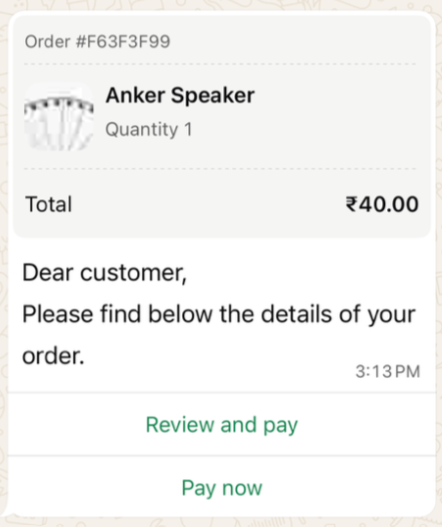
An order details template lets you send the order details outside the customer service window. The order_details object is passed as the parameter of the template's order details button.
{
  "messages": {
    "authentication": {
      "productToken": "YOUR_PRODUCT_TOKEN"
    },
    "msg": [
      {
        "from": "00916098765432",
        "to": [
          { "number": "00916012345678" }
        ],
        "body": {
          "type": "auto",
          "content": "Here is your order summary."
        },
        "allowedChannels": ["WhatsApp"],
        "richContent": {
          "conversation": [
            {
              "template": {
                "whatsapp": {
                  "element_name": "order_details_in_payments",
                  "language": { "policy": "deterministic", "code": "en" },
                  "components": [
                    {
                      "type": "header",
                      "parameters": [
                        {
                          "type": "image",
                          "media": {
                            "mediaUri": "https://www.example.com/images/order.png",
                            "mimeType": "image/png"
                          }
                        }
                      ]
                    },
                    {
                      "type": "button",
                      "sub_type": "order_details",
                      "index": 0,
                      "parameters": [
                        {
                          "type": "action",
                          "action": {
                            "order_details": {
                              "reference_id": "F63F3F99",
                              "type": "digital-goods",
                              "payment_type": "upi",
                              "payment_configuration": "my-payment-config",
                              "currency": "INR",
                              "total_amount": { "value": 4000, "offset": 100 },
                              "payment_settings": [
                                {
                                  "type": "upi_intent_link",
                                  "upi_intent_link": {
                                    "link": "upi://pay?pa=anything@payu&pn=ABC&tr=877376394&am=40.00&cu=INR&mode=00&purpose=00&mc=5399&tn=877376394"
                                  }
                                }
                              ],
                              "order": {
                                "status": "pending",
                                "items": [
                                  {
                                    "retailer_id": "42703ed5a",
                                    "name": "Anker Speaker",
                                    "amount": { "value": 4000, "offset": 100 },
                                    "quantity": 1,
                                    "country_of_origin": "India",
                                    "importer_name": "CM.com",
                                    "importer_address": {
                                      "address_line1": "Saket District Centre, Sector 6, Pushp Vihar",
                                      "city": "New Delhi",
                                      "postal_code": "110017",
                                      "country_code": "IN"
                                    }
                                  }
                                ],
                                "subtotal": { "value": 4000, "offset": 100 },
                                "tax": { "value": 0, "offset": 100 },
                                "shipping": { "value": 0, "offset": 100 },
                                "discount": { "value": 0, "offset": 100 }
                              }
                            }
                          }
                        }
                      ]
                    }
                  ]
                }
              }
            }
          ]
        }
      }
    ]
  }
}
Update the order status
Send an order_status message whenever the status of an order changes, for example when you receive the payment or ship the order.
Order statuses
| Status | Use when… |
|---|---|
pending | The order has been created. This is the initial status. |
processing | You have received the payment. |
shipped / partially-shipped | Physical goods are in transit. |
completed | The service has been delivered or the item has arrived. |
canceled | The order is cancelled. Only possible before payment is captured. |
Payment statuses
| Status | Effect |
|---|---|
pending | The payment is pending. |
captured | A green Paid label with a tick is added to the user's order bubble. |
failed | The user is told the payment did not go through. |
- Use the
expirationobject inorder_detailsfor time-sensitive offers or limited stock. When the order expires, the pay button is disabled automatically. - Use WhatsApp formatting in the body text to highlight important information, for example: Please complete your UPI payment within 15 minutes.
Interactive order_status message
| Field | Required | Description |
|---|---|---|
interactive.type | Yes | order_status |
body.text | Yes | Message text. |
action.name | Yes | review_order |
parameters.reference_id | Yes | The reference_id of the order. |
parameters.order.status | Yes | The new order status. |
parameters.order.description | No | Explanation shown to the user. |
{
  "messages": {
    "authentication": {
      "productToken": "YOUR_PRODUCT_TOKEN"
    },
    "msg": [
      {
        "from": "00916098765432",
        "to": [
          { "number": "00916012345678" }
        ],
        "body": {
          "type": "auto",
          "content": "Your order status has been updated."
        },
        "allowedChannels": ["WhatsApp"],
        "richContent": {
          "conversation": [
            {
              "interactive": {
                "type": "order_status",
                "body": {
                  "text": "This is the status of your order."
                },
                "action": {
                  "name": "review_order",
                  "parameters": {
                    "reference_id": "F63F3F99",
                    "order": {
                      "status": "pending",
                      "description": "Order will be cancelled if not paid by the expiration time."
                    }
                  }
                }
              }
            }
          ]
        }
      }
    ]
  }
}
order_status template
{
  "messages": {
    "authentication": {
      "productToken": "YOUR_PRODUCT_TOKEN"
    },
    "msg": [
      {
        "from": "00916098765432",
        "to": [
          { "number": "00916012345678" }
        ],
        "body": {
          "type": "auto",
          "content": "Your order status has been updated."
        },
        "allowedChannels": ["WhatsApp"],
        "richContent": {
          "conversation": [
            {
              "template": {
                "whatsapp": {
                  "element_name": "order_status_in_payments",
                  "language": { "policy": "deterministic", "code": "en" },
                  "components": [
                    {
                      "type": "order_status",
                      "parameters": [
                        {
                          "type": "order_status",
                          "order_status": {
                            "reference_id": "F63F3F99",
                            "order": {
                              "status": "processing",
                              "description": "Thanks for your order. We are working on it!"
                            }
                          }
                        }
                      ]
                    }
                  ]
                }
              }
            }
          ]
        }
      }
    ]
  }
}