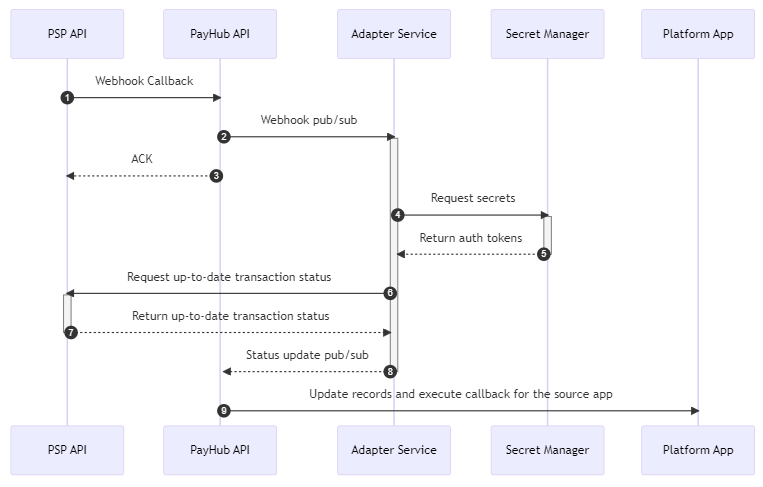
Payment Integrations
Overview
This document provides information about how implementation of Payment Service Providers can be integrated with CM products thru Marketplace.
We support following PSPs
- Amazon Pay (Payfort - Middle east version)
- Adyen
- CM
- GPI
- Mollie
- Paypal
Swagger docs at https://api.payhub.cm.com/docs/index.html
1. Setup a PSP connection
- Configure a PSP connection using PayHub API or Visit marketplace app https://www.cm.com/en-gb/app/marketplace/
- Add your PSP specific keys/secrets to the connection
Adding a connection
curl --location --request POST 'https://api.cmtest.nl/payhub/v1/accounts/d532fdef-908b-4ce5-8f07-874587cadd7e/connections' \ --header 'Content-Type: application/json' \ --header 'Accept: text/plain' \ --header 'X-CM-SSO-ACCOUNTGUID: ce4e6c52-5696-405b-9524-e478468f0563' \ --data-raw '{ "name": "CM GPI Sandbox", "pspCode": "GPI", "isSandbox": true, "baseUrl": "https://api.pit.paygateway.com", "data": { "displayName": "CM.com GPI test merchant" } }' |
Add secrets to a connection
curl --location --request POST 'https://api.cmtest.nl/payhub/v1/accounts/d532fdef-908b-4ce5-8f07-874587cadd7e/connections/ffb4660a-b40b-4659-988e-fcd19180f524/secrets' \ --header 'X-CM-SSO-ACCOUNTGUID: ce4e6c52-5696-405b-9524-e478468f0563' \ --header 'Content-Type: application/json' \ --data-raw '{ "Account-Credential": "900000052963:80040196:1sMWAiPxRrxUzzcOCHoJTniwQlK20Csp", "Transactions-X-GP-API-Key": "PgZp02dobAUv6Vwpz7PREdeFBC2SVyGy", "Transactions-X-GP-API-Secret": "1F8G0c9AU3UwKAh99CBHwJgMfdM7PYmkUXGVqQeFXMQ", "PayFields-X-GP-API-Key": "Nvury7RZMhZX0hEPxcvfD6RThzFNppln" }' |
Please note that secrets change per payment provider.
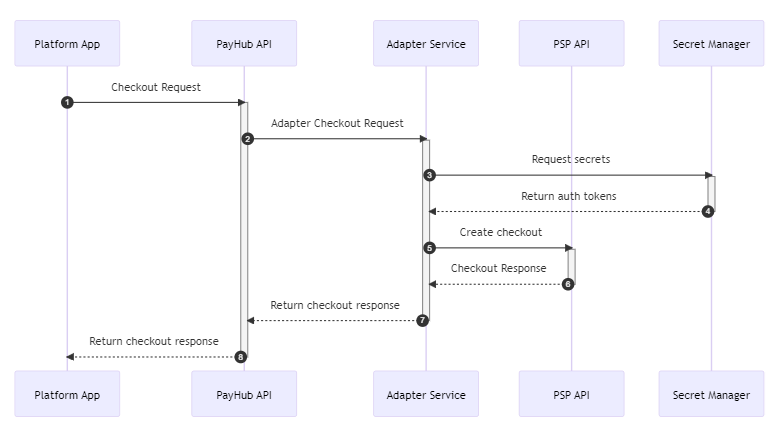
2. Create a Checkout via PayHub API
- Create a checkout using your configured PSP connection (Get connectionid from step 1)
- You need to supply a minimal amount of data to create a Transaction, you can supply some addtional data if needed
Create a checkout
curl --location --request POST 'https://api.cmtest.nl/payhub/v1/accounts/d532fdef-908b-4ce5-8f07-874587cadd7e/transactions' \ --header 'Content-Type: application/json' \ --header 'Accept: text/plain' \ --header 'X-CM-SSO-ACCOUNTGUID: ce4e6c52-5696-405b-9524-e478468f0563' \ --data-raw '{ "description": "MVP test", "amount": { "amount": "10.99", "currency": "USD" }, "connectionId": "e0b6b5ea-7ed7-46f9-92b3-26434f245c66", "expiresAtUtc": "2023-10-31T11:06:49.106Z", "reference": "testref", "returnUrlSuccess": "https://cm.com?status=success", "returnUrlFailure": "https://cm.com?status=failed", "webhook": "https://webhook.site/adad9271-05f5-4532-ba66-0b728edc2ad2" }' |
3. Refund a transaction
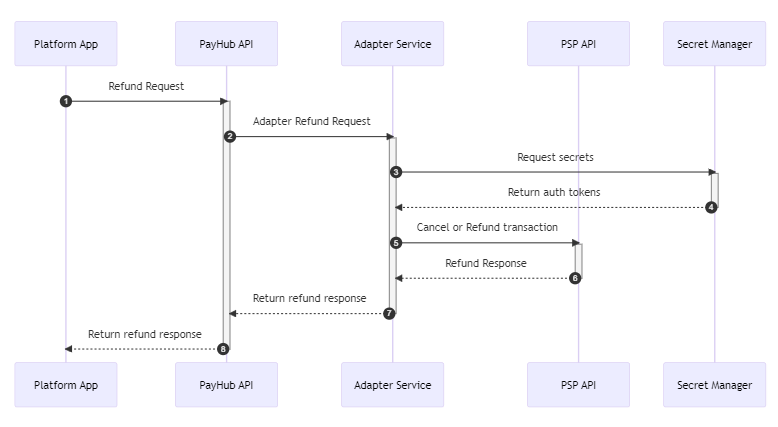
- PayHub has a refund endpoint which refunds or cancels transaction based on transaction status
Refund/Cancel a transaction
curl --location 'https://api.cmtest.nl/payhub/v1/accounts/d532fdef-908b-4ce5-8f07-874587cadd7e/transactions/c0bf770f-5c7f-45db-a765-661b3f874799/refund' \ --header 'Content-Type: application/json' \ --header 'Accept: text/plain' \ --header 'X-CM-SSO-ACCOUNTGUID: de4e6c52-5696-405b-9524-e478468f0653' \ --data '{ "amount": { "amount": "10.99", "currency": "USD" }, "description": "Test refund", "reference": "test ref" }' |
4. Handle webhooks
- You can specify your webhook endpoint per checkout, you need to have an endpoint to handle webhook callbacks.
- It's a post call with the following json body
{ "id": "c5036ee5-619f-42b2-b6ed-3d0c927008a9", "pspReference": "MER-c5036ee5-619f-42b2-b6ed-3d0c927008a9", "reference": "my unique referenceere", "status": "Completed", "updatedAtUtc": "2023-02-14T12:49:05.2939418Z" } |