Redundancy & High Availability
Redundancy & High Availability — CM Marketplace Platform
This document describes how the CM Marketplace platform achieves redundancy, fault tolerance, and high availability across all layers of the stack. Every component — from the database to the application services to the messaging infrastructure — is designed for production resilience.
1. Architecture Overview
The Marketplace platform runs on Google Cloud Platform (GCP) in the europe-west4 region (Netherlands). Infrastructure is fully managed as code via Terraform with modular design.
| Layer | Technology | HA Mechanism |
|---|---|---|
| Compute | Cloud Run (Knative) | Auto-scaling, min/max instances |
| Orchestration | GKE Autopilot | Managed Kubernetes, auto-repair |
| Database | Cloud SQL (PostgreSQL 14) | Regional HA with automatic failover |
| Cache | Memorystore (Redis) | Direct peering, VPC-integrated |
| Messaging | Pub/Sub + Cloud Tasks | Dead-letter queues, retry with backoff |
| Networking | VPC + Cloud NAT | Static IP, shared NAT, access connectors |
| Secrets | Secret Manager | Per-service isolation |
| Monitoring | Cloud Monitoring | 5xx alerting, email notifications |
Microservices
The platform consists of 13 independently deployable services:
| Service | Purpose | Min Instances |
|---|---|---|
| configuration | Central configuration & tenant management | 1 |
| crm | CRM adapter (Salesforce, Dynamics, Shopify, SAP, HubSpot) | 1 |
| livechat | Livechat adapter (Salesforce, Genesys, CXOne, Zendesk) | 2 |
| cdp | Customer Data Platform | 1 |
| cms | Content Management System | 1 |
| comms | Communications / Messaging service | 1 |
| product-feed | Product catalog management | 1 |
| integrations | Third-party integrations | 1 |
| jsltservice | JSLT transformation engine | 1 |
| marketplace-frontend | Angular frontend application | 1 |
| marketplace-app-ui | UI component library | 1 |
| app-bgservice | Background services (SSE, WebSocket workers) | — |
| app-payment | Payment processing (PayHub adapter) | — |
2. Database — Regional High Availability
The production database uses Cloud SQL PostgreSQL 14 with REGIONAL availability, meaning it maintains a synchronous standby replica in a different zone within the same region. Failover is automatic and transparent to the application.
Production Database Configuration
# infra/environments/production/database.tf

module "database" {
  source           = "../../modules/database"
  common_variables = local.common_variables

  db_configuration = {
    location_preference_zone = "europe-west4-c"
    db_disk_size             = 20
    availability_type        = "REGIONAL"
    tier                     = "db-custom-1-3840"
    database_version         = "POSTGRES_14"
    instance_type            = "CLOUD_SQL_INSTANCE"
    name                     = "connectcoredb"
    start_time               = "12:00"
    region                   = "europe-west4"
  }
}
Database Module — Backup & Recovery
# infra/modules/database/main.tf

resource "google_sql_database_instance" "connect-core-db" {
  database_version    = var.db_configuration.database_version
  deletion_protection = true
  name                = var.db_configuration.name
  region              = var.db_configuration.region

  settings {
    activation_policy           = "ALWAYS"
    availability_type           = var.db_configuration.availability_type
    deletion_protection_enabled = true
    disk_autoresize             = true
    disk_autoresize_limit       = 0
    disk_type                   = "PD_SSD"

    backup_configuration {
      enabled                        = true
      location                       = "eu"
      point_in_time_recovery_enabled = true
      start_time                     = var.db_configuration.start_time
      transaction_log_retention_days = 7

      backup_retention_settings {
        retained_backups = 7
        retention_unit   = "COUNT"
      }
    }
  }

  lifecycle {
    prevent_destroy = true
  }
}
Key HA features:
- REGIONAL availability: Synchronous standby in another zone — automatic failover with no data loss
- Point-in-time recovery (PITR): Restore to any second within the last 7 days
- Automated backups: Daily at 12:00 UTC, stored in the EU, 7 retained
- SSD disks with auto-resize: No manual capacity planning needed
- Deletion protection: Both at the Terraform and GCP API level
prevent_destroylifecycle: Terraform cannot accidentally destroy the instance
Connection Pooling
All services connect with a maximum pool size of 1024 to handle burst traffic without exhausting connections:
ConnectionStrings: "Host=...;Pooling=true;Maximum Pool Size=1024;"
3. Compute — Cloud Run Auto-Scaling
Every service runs on Google Cloud Run with Knative autoscaling. Each service maintains a minimum of 1 instance (livechat maintains 2) so there is always a warm container ready to serve traffic. Scaling up to 10 instances happens automatically based on request concurrency.
Production Cloud Run Configuration
# infra/environments/production/cloudrun.tf

module "cloudrun" {
  source           = "../../modules/cloudrun"
  common_variables = local.common_variables

  cloud_run_services = [
    {
      name                  = "crm"
      container_concurrency = 50
      timeout_seconds       = 300
      cpu_limit             = "1"
      memory_limit          = "1Gi"
      annotations = {
        "autoscaling.knative.dev/minScale"        = "1"
        "autoscaling.knative.dev/maxScale"        = "10"
        "run.googleapis.com/cloudsql-instances"    = "project:europe-west4:connectcoredb"
        "run.googleapis.com/vpc-access-connector"  = module.vpc_network.access_connector_ids.shared-nat
        "run.googleapis.com/vpc-access-egress"     = "all-traffic"
      }
    },
    {
      name                  = "livechat"
      container_concurrency = 50
      timeout_seconds       = 300
      cpu_limit             = "1"
      memory_limit          = "1Gi"
      annotations = {
        "autoscaling.knative.dev/minScale"        = "2"
        "autoscaling.knative.dev/maxScale"        = "10"
        ...
      }
    },
    {
      name                  = "product-feed"
      container_concurrency = 50
      timeout_seconds       = 3600
      cpu_limit             = "1"
      memory_limit          = "2Gi"
      ...
    },
    # ... 11 services total
  ]
}
Cloud Run Module — Traffic & Revision Management
# infra/modules/cloudrun/main.tf

resource "google_cloud_run_service" "cloud_run_services" {
  for_each = { for service in var.cloud_run_services : service.name => service }

  template {
    spec {
      container_concurrency = each.value.container_concurrency
      timeout_seconds       = each.value.timeout_seconds

      containers {
        image = each.value.image
        resources {
          limits = {
            cpu    = each.value.cpu_limit
            memory = each.value.memory_limit
          }
        }
      }
    }
  }

  traffic {
    percent         = 100
    latest_revision = true
  }
}
Key HA features:
- Minimum instances always warm: No cold-start latency for first request
- Concurrency limit per instance: 50 requests (20 for CMS/background) — prevents overload
- Automatic scale-out: Cloud Run adds instances when concurrency threshold is approached
- Revision-based deploys: Previous revisions remain available for instant rollback
- 100% traffic to latest: Zero-downtime rolling deployments
Service Resource Summary
| Service | Memory | CPU | Concurrency | Timeout | Min Scale |
|---|---|---|---|---|---|
| crm | 1Gi | 1 vCPU | 50 | 300s | 1 |
| livechat | 1Gi | 1 vCPU | 50 | 300s | 2 |
| product-feed | 2Gi | 1 vCPU | 50 | 3600s | 1 |
| cms | 1Gi | 1 vCPU | 20 | 3600s | 1 |
| cdp | 1Gi | 1 vCPU | 50 | 300s | 1 |
| configuration | 1Gi | 1 vCPU | 50 | 300s | 1 |
| comms | 1Gi | 1 vCPU | 50 | 300s | 1 |
| integrations | 512Mi | 1 vCPU | 50 | 300s | 1 |
| jsltservice | 1Gi | 1 vCPU | 50 | 300s | 1 |
| frontend | 1Gi | 1 vCPU | 50 | 300s | 1 |
| app-ui | 1Gi | 1 vCPU | 50 | 300s | 1 |
4. GKE Autopilot — Managed Kubernetes
For workloads that require long-running containers (background services, WebSocket connections), we use GKE Autopilot which is fully managed by Google — automatic node provisioning, repair, and security patching.
# infra/modules/gke/main.tf

resource "google_container_cluster" "primary" {
  name     = "${local.google_project}-gke-autopilot"
  location = local.region

  enable_autopilot = true
}
Key HA features:
- Autopilot mode: Google manages node pools, scaling, security patches, and repair
- Regional cluster: Nodes spread across multiple zones
- Automatic pod rescheduling: If a node fails, pods move to healthy nodes
5. Caching Layer — Redis (Memorystore)
Distributed caching is handled by Google Cloud Memorystore for Redis, connected via VPC direct peering for low-latency access from all services.
Redis Infrastructure
# infra/modules/redis/main.tf

resource "google_redis_instance" "connectcache" {
  authorized_network      = var.vpc_network_id
  connect_mode            = "DIRECT_PEERING"
  location_id             = "${local.region}-${var.redis_zone}"
  memory_size_gb          = var.memory_size_gb
  name                    = "connectcache"
  tier                    = "BASIC"
  read_replicas_mode      = "READ_REPLICAS_DISABLED"
  transit_encryption_mode = "DISABLED"

  persistence_config {
    persistence_mode = "DISABLED"
  }

  lifecycle {
    prevent_destroy = true
  }
}
Cache Provider — Application Layer
// src/lib-shared/Cache/CacheProvider.cs

public sealed class CacheProvider : ICacheProvider
{
    private readonly IDistributedCache _cache;
    private readonly RedisConfiguration _config;

    public async Task<T?> GetCacheAsync<T>(string key) where T : class
    {
        var searchKey = $"{_config.AppName}_{key}";
        var result = await _cache.GetStringAsync(searchKey);
        if (string.IsNullOrEmpty(result)) return null;
        return JsonSerializer.Deserialize<T>(result);
    }

    public async Task SetCacheAsync<T>(string key, T value, bool isSliding = false)
    {
        var options = new DistributedCacheEntryOptions();
        if (isSliding)
            options.SetSlidingExpiration(
                TimeSpan.FromMinutes(_config.SlidingExpirationInMinutes));
        else
            options.SetAbsoluteExpiration(
                TimeSpan.FromMinutes(_config.AbsoluteExpirationInMinutes));

        var serializedValue = JsonSerializer.Serialize(value);
        var searchKey = $"{_config.AppName}_{key}";
        await _cache.SetStringAsync(searchKey, serializedValue, options);
    }

    public async Task UpdateCacheAsync<T>(string key, T value, bool isSliding = false)
    {
        var searchKey = $"{_config.AppName}_{key}";
        var cache = await _cache.GetStringAsync(searchKey);
        if (string.IsNullOrWhiteSpace(cache)) return;

        // Preserve existing TTL on update
        var redis = await ConnectionMultiplexer.ConnectAsync(_config.Location);
        var db = redis.GetDatabase();
        var expiry = await db.KeyTimeToLiveAsync(searchKey);
        // ... reapply same expiration ...
        await _cache.SetStringAsync(searchKey, serializedValue, options);
    }
}
Cache Configuration
// src/lib-shared/Cache/RedisConfiguration.cs

public sealed class RedisConfiguration
{
    [Required] public required string Location { get; init; }
    [Required] public required int SlidingExpirationInMinutes { get; init; } = 15;
    [Required] public required int AbsoluteExpirationInMinutes { get; init; } = 1440;
    public string AppName { get; init; } = "";
}
Key features:
- Namespace isolation: Each service prefixes keys with
{AppName}_(e.g.,CRM_,LIVECHAT_) - Dual expiration strategies: Sliding (15 min default) for session data, Absolute (24 hours) for config data
- TTL preservation on updates: UpdateCacheAsync reads and reapplies the existing TTL
- Validated at startup:
[Required]attributes enforce configuration correctness
6. Redis-Backed Message Queue
For real-time workload distribution (e.g., livechat handover queuing), we use a Redis Sorted Set-based queue that provides ordered, position-tracked message delivery.
// src/lib-shared/Queue/RedisQueueService.cs

public class RedisQueueService(
    IDatabase database,
    IOptions<QueueConfiguration> options,
    ILogger<RedisQueueService> logger) : IQueueService
{
    public async Task<EnqueueResult> EnqueueAsync(
        Guid tenantAdapterId, string channel, string serializedPayload)
    {
        var channelKey = $"{tenantAdapterId}_{channel}";
        var masterKey = $"{tenantAdapterId}_{_config.KeyPrefix}";

        var score = DateTimeOffset.UtcNow.ToUnixTimeMilliseconds();
        await database.SortedSetAddAsync(
            $"{_config.KeyPrefix}:{channelKey}", serializedPayload, score);
        await database.SetAddAsync(masterKey, channelKey);

        var length = await database.SortedSetLengthAsync(
            $"{_config.KeyPrefix}:{channelKey}");
        var rank = await database.SortedSetRankAsync(
            $"{_config.KeyPrefix}:{channelKey}", serializedPayload);

        return new EnqueueResult
        {
            Success = true,
            QueuePosition = (rank ?? length - 1) + 1,
            QueueLength = length
        };
    }

    public async Task<string?> DequeueAsync(
        Guid tenantAdapterId, string channelKey)
    {
        var entry = await database.SortedSetPopAsync(
            $"{_config.KeyPrefix}:{channelKey}", Order.Ascending);
        if (entry is null)
        {
            await database.SetRemoveAsync(
                $"{tenantAdapterId}_{_config.KeyPrefix}", channelKey);
            return null;
        }

        // Auto-cleanup: remove channel from master when empty
        var remaining = await database.SortedSetLengthAsync(
            $"{_config.KeyPrefix}:{channelKey}");
        if (remaining == 0)
            await database.SetRemoveAsync(
                $"{tenantAdapterId}_{_config.KeyPrefix}", channelKey);

        return entry.Value.Element.ToString();
    }
}
Key features:
- Ordered processing: ZSET with Unix timestamp scoring ensures FIFO delivery
- Position tracking: Callers know their exact queue position
- Auto-cleanup: Empty queues are automatically removed from the master index
- Multi-tenant isolation: Keys are prefixed with
{tenantAdapterId}
7. Event-Driven Architecture — Pub/Sub with Dead Letter Queues
All inter-service communication uses Google Cloud Pub/Sub with attribute-based routing. Failed messages are automatically routed to a dead-letter topic after 5 delivery attempts.
Pub/Sub Configuration
# infra/environments/production/pubsub.tf

module "pubsub" {
  source = "../../modules/pubsub"

  topics = [
    { name = "Events" },
    { name = "Events-error" }    # Dead-letter topic
  ]
  error_topic = "Events-error"

  subscriptions = [
    {
      name   = "CRMEvents"
      filter = "attributes.integration = \"CRM\""
      topic_name = "Events"
      push_config = {
        endpoint = "${module.cloudrun.run_urls.crm}/v1/events"
        no_wrapper = { write_metadata = true }
      }
      dead_letter_policy = {
        dead_letter_topic     = "projects/.../topics/Events-error"
        max_delivery_attempts = 5
      }
      retry_policy = {
        minimum_backoff = "10s"
        maximum_backoff = "600s"
      }
    },
    {
      name   = "LivechatInternalEvent"
      filter = "attributes.integrationName= \"Livechat\""
      push_config = {
        endpoint = "${module.cloudrun.run_urls.livechat}/v1/internal-event"
      }
      dead_letter_policy = { ... }
      retry_policy = {
        minimum_backoff = "10s"
        maximum_backoff = "600s"
      }
    },
    # ... 11 subscriptions total, plus dead-letter subscriber
  ]
}
All Production Subscriptions
| Subscription | Filter | Push Endpoint |
|---|---|---|
| TokenRefresh | FailedType = "TokenRefresh" | (pull) |
| CRMEvents | integration = "CRM" | crm/v1/events |
| CRMEventsToCDP | AdapterKey = "CDP" | cdp/v1/events |
| CRMSyncEventsToCDP | AdapterKey = "CDP-SYNC" | cdp/v1/sync |
| CRMInternalEvent | integrationName = "CRM" | crm/v1/internal-event |
| CDPInternalEvent | integrationName = "Ads" | cdp/v1/internal-event |
| CDPInternalEventDataTransfer | integrationName = "Data Transfer" | cdp/v1/internal-event |
| LivechatInternalEvent | integrationName = "Livechat" | livechat/v1/internal-event |
| CommsInternalEvent | integrationName = "Internal Comm" | comms/v1/internal-event |
| ProductfeedInternalEvent | integrationName = "Product Feed" | product-feed/v1/internal-event |
| CMSInternalEvent | integrationName = "CMS" | cms/v1/internal-event |
| dead-letter | (none — all from Events-error) | (pull) |
Key HA features:
- Attribute-based filtering: Each subscription only receives messages it cares about
- Dead-letter queue: Failed messages (after 5 attempts) route to
Events-errorfor investigation - Exponential backoff retry: 10s minimum to 600s (10 min) maximum backoff
- 7-day message retention: Messages survive extended service outages
- Push delivery with OIDC auth: Secure, authenticated delivery to Cloud Run services
- At-least-once delivery: Pub/Sub guarantees no message is lost
8. Async Task Queues — Cloud Tasks
For work that needs controlled dispatch rates and guaranteed execution, we use Google Cloud Tasks with 4 dedicated queues:
# infra/environments/production/cloudtask.tf

module "cloudtasks" {
  cloudtask_list = [
    {
      name           = "slack_genai"
      max_concurrent = 1000
      max_dispatches = 500
      max_attempts   = 3
      max_backoff    = "3600s"
      max_doublings  = 16
      min_backoff    = "3s"
    },
    {
      name           = "event_queue"
      max_concurrent = 1000
      max_dispatches = 500
      max_attempts   = 3
      max_backoff    = "3600s"
      max_doublings  = 16
      min_backoff    = "3s"
    },
    {
      name           = "product_feed_queue"
      max_concurrent = 1000
      max_dispatches = 500
      max_attempts   = 3
      ...
    },
    {
      name           = "livechat_queue"
      max_concurrent = 1000
      max_dispatches = 500
      max_attempts   = 3
      ...
    }
  ]
}
Cloud Tasks Module
# infra/modules/cloudtasks/main.tf

resource "google_cloud_tasks_queue" "cloudtasks" {
  for_each = { for cloudtask in var.cloudtask_list : cloudtask.name => cloudtask }

  rate_limits {
    max_concurrent_dispatches = each.value.max_concurrent
    max_dispatches_per_second = each.value.max_dispatches
  }
  retry_config {
    max_attempts  = each.value.max_attempts
    max_backoff   = each.value.max_backoff
    max_doublings = each.value.max_doublings
    min_backoff   = each.value.min_backoff
  }
}
Key HA features:
- Rate limiting: 1000 concurrent / 500 per second prevents downstream overload
- 3 retry attempts with exponential backoff (3s to doubled up to 16 times to max 1 hour)
- Separate queues per domain: Failures in one queue don't block another
9. Application Resilience Patterns
Polly Retry with Exponential Backoff
The Livechat Salesforce adapter uses Polly for retry with exponential backoff on HTTP failures:
// src/app-livechat/.../Services/AsyncRetryService.cs

public class AsyncRetryService(
    IOptions<SalesforcePartnerMessagingConfiguration> configuration,
    ILogger<AsyncRetryService> logger) : IAsyncRetryService
{
    public AsyncRetryPolicy<Response<object>> GetRetryPolicyAsync()
    {
        TryParse(_pollyMaxRetries, out var maxRetries);

        return Policy<Response<object>>
            .Handle<HttpRequestException>(
                ex => ex.StatusCode != HttpStatusCode.OK)
            .WaitAndRetryAsync(
                maxRetries,
                attemptNumber => TimeSpan.FromSeconds(attemptNumber * 2),
                (exception, sleepDuration, attemptNumber, context) =>
                {
                    logger.LogInformation(
                        "Retrying in {SleepDuration}. {AttemptNumber} / {MaxRetries}",
                        sleepDuration, attemptNumber, maxRetries);
                });
    }
}
Retry schedule: Attempt 1 = 2s, Attempt 2 = 4s, Attempt 3 = 6s, etc.
SSE Connection — Infinite Retry with State Persistence
The Salesforce Enhanced Chat background service maintains persistent SSE connections with infinite retry and state persistence on shutdown:
// src/app-bgservice/.../Services/SalesforceSseBackgroundService.cs

public class SalesforceSseBackgroundService : BackgroundService
{
    private readonly ConcurrentDictionary<string, SalesforceSseConnectionState>
        _activeConnections = new();

    private async Task StartSseConnectionAsync(
        string tenantAdapterId,
        ConfigurationSettings configurationSettings,
        string esDeveloperName,
        CancellationToken stoppingToken)
    {
        // Retry forever with 5-second intervals
        var retryPolicy = Policy
            .Handle<Exception>()
            .WaitAndRetryForeverAsync(
                _ => TimeSpan.FromSeconds(5),
                (exception, retryCount, timeSpan) =>
                {
                    logger.LogInformation(
                        "SSE connection retry {RetryCount} for adapter {AdapterId}: {Message}",
                        retryCount, tenantAdapterId, exception.Message);
                });

        await retryPolicy.ExecuteAsync(async () =>
        {
            await ConnectAndListenSseAsync(
                tenantAdapterId, configurationSettings,
                esDeveloperName, stoppingToken);
        });
    }
}
Graceful Shutdown — Event State Persistence
When the service shuts down, all active SSE connection states are persisted to cache so they can be resumed:
// src/app-bgservice/.../Services/SalesforceSseBackgroundService.cs

public override async Task StopAsync(CancellationToken cancellationToken)
{
    logger.LogInformation(
        "StopAsync called — persisting all active SSE connection states");
    await PersistAllConnectionStatesAsync();
    await base.StopAsync(cancellationToken);
    logger.LogInformation("All SSE connection states persisted. Service stopped");
}

private async Task PersistAllConnectionStatesAsync()
{
    var tasks = _activeConnections.Values
        .Where(state => !string.IsNullOrEmpty(state.CurrentEventId))
        .Select(async state =>
        {
            await PersistLastEventIdAsync(
                state.CurrentEventId,
                state.EsDeveloperName,
                state.OrganizationId,
                state.TenantAdapterSession);
        });

    await Task.WhenAll(tasks);
}
Key resilience features:
- WaitAndRetryForeverAsync: SSE connections never give up — they reconnect indefinitely
- Last-Event-Id tracking: On reconnection, the SSE stream resumes from the last processed event
- Graceful shutdown: All in-flight event IDs are persisted before the container stops
- Token refresh: Expired tokens trigger automatic re-authentication without losing the event position
- ConcurrentDictionary: Thread-safe tracking of multiple simultaneous SSE connections
10. Networking & Security
VPC & Cloud NAT
All backend services route egress traffic through a shared NAT gateway with a static IP address, enabling IP-based allowlisting by external partners.
# infra/modules/vpc_network/network.tf

resource "google_compute_network" "default" {
  auto_create_subnetworks = true
  routing_mode            = "REGIONAL"
}
# infra/modules/vpc_network/router.tf

resource "google_compute_router_nat" "shared-nat" {
  name                       = var.vpc_network.nat_name
  nat_ip_allocate_option     = "MANUAL_ONLY"
  nat_ips                    = [google_compute_address.static-marketplace.id]
  min_ports_per_vm           = var.vpc_network.min_ports_per_vm
  tcp_established_idle_timeout_sec = 1200
  tcp_time_wait_timeout_sec       = 120
  tcp_transitory_idle_timeout_sec = 30
}
# infra/modules/vpc_network/access_connector.tf

resource "google_vpc_access_connector" "shared-nat" {
  machine_type   = "f1-micro"
  max_instances  = 10
  min_instances  = 2
  max_throughput = 1000
  min_throughput = 200
}
Key features:
- Static outbound IP: All services share a single public IP for partner allowlisting
- VPC Access Connector: 2-10 instances, 200-1000 Mbps throughput, auto-scales
- Regional routing: Traffic stays within europe-west4
Service Account Isolation (IAM)
Each service runs under its own service account with least-privilege roles:
# infra/environments/production/main.tf

sa_roles = {
  crm           = ["roles/cloudsql.client", "roles/cloudtasks.enqueuer",
                   "roles/pubsub.publisher", "roles/redis.dbConnectionUser"]
  livechat      = ["roles/cloudscheduler.admin", "roles/cloudtasks.enqueuer",
                   "roles/redis.dbConnectionUser"]
  configuration = ["roles/cloudsql.client", "roles/cloudtasks.enqueuer",
                   "roles/pubsub.publisher", "roles/redis.dbConnectionUser"]
  product-feed  = ["roles/cloudtasks.enqueuer", "roles/storage.objectUser",
                   "roles/redis.dbConnectionUser"]
  cdp           = ["roles/redis.dbConnectionUser", "roles/storage.objectUser",
                   "roles/cloudscheduler.admin"]
  cms           = ["roles/cloudscheduler.admin", "roles/cloudtasks.enqueuer",
                   "roles/redis.dbConnectionUser", "roles/storage.objectUser"]
  comms         = ["roles/cloudtasks.enqueuer", "roles/redis.dbConnectionUser"]
}
Secrets Management
Secrets are stored in Google Secret Manager with per-service categories:
secret_list = ["common", "product_feed", "configuration",
               "crm", "livechat", "cms", "comms", "integrations", "cdp"]
Secrets are injected as environment variables at Cloud Run startup — never stored in code or images.
11. Monitoring & Alerting
5xx Error Alert
# infra/modules/alerting/main.tf

resource "google_monitoring_alert_policy" "cloudrun_5xx_alert" {
  display_name = "Cloud Run - Error Alert"
  combiner     = "OR"
  enabled      = true

  conditions {
    display_name = "Cloud Run service has 5xx errors"

    condition_threshold {
      filter     = <<-EOT
        resource.type = "cloud_run_revision"
        AND metric.type = "run.googleapis.com/request_count"
        AND metric.labels.response_code_class = "5xx"
      EOT
      duration        = "60s"
      comparison      = "COMPARISON_GT"
      threshold_value = 2

      aggregations {
        alignment_period   = "60s"
        per_series_aligner = "ALIGN_DELTA"
        group_by_fields    = [
          "resource.labels.service_name",
          "metric.labels.response_code"
        ]
      }
    }
  }

  alert_strategy {
    auto_close = "1800s"
  }
}
Alerting behavior:
- Triggers when any Cloud Run service returns more than 2 5xx errors in 60 seconds
- Groups by service name and response code for targeted triage
- Auto-closes after 30 minutes of no further errors
- Sends email notification to the Marketplace team
12. Container Security
All services run as a non-root user inside Docker containers:
# src/app-crm/.../Dockerfile

FROM proget2.sharedservices.cmgroep.local/dockerfeed/trusted/dotnet/aspnet:10.0

RUN groupadd --gid 1001 appuser \
    && useradd --uid 1001 --gid 1001 -m appuser

USER appuser
WORKDIR /app
COPY ${BUILD_DIR} ./
EXPOSE 80
EXPOSE 443
ENTRYPOINT ["dotnet", "CM.Marketplace.Adapters.CRM.Web.API.dll"]
13. CI/CD — Zero-Downtime Deployments
Deployment Pipeline
Push to main -> Build & Test -> Docker Build -> Push to Artifact Registry
    -> Auto-deploy to Acceptance -> Manual trigger -> Deploy to Production
Production Deployment Workflow
# .github/workflows/deploy-prod.yaml

name: Deploy to Production
on:
  workflow_dispatch:
  repository_dispatch:
    types: [artifact_committed_prod]

jobs:
  deploy:
    runs-on: engage-hosted
    environment: Production
    concurrency:
      group: ${{ github.workflow }}-${{ github.ref }}
      cancel-in-progress: false

    steps:
      - name: Checkout
        uses: actions/checkout@v4

      - name: Install Terraform
        uses: hashicorp/setup-terraform@v3

      - name: Google Auth
        uses: google-github-actions/auth@v2

      - name: Run Terraform init
        run: terraform init

      - name: Create Terraform plan
        run: terraform plan -var-file="production.tfvars.json" -out=plan

      - name: Apply Terraform
        run: terraform apply --auto-approve "plan"
Key HA features:
- Concurrency control: Only one deploy runs at a time (cancel-in-progress: false)
- Environment protection: Production requires manual approval
- Terraform plan + apply: Changes are previewed before applying
- Cloud Run traffic management: 100% traffic shifts to the new revision only after health checks pass
- Instant rollback: Previous Cloud Run revisions remain available
14. Rollback Procedures
This section documents step-by-step rollback procedures for every layer of the platform. All rollback commands use gcloud CLI or GCP Console and should be executed by the Engineering Leader or an authorized team member.
14.1 Cloud Run Service Rollback
Use this when a new deployment causes errors (5xx alerts, broken functionality). Cloud Run keeps all previous revisions available.
-
Navigate to Revisions of specified cloud run service
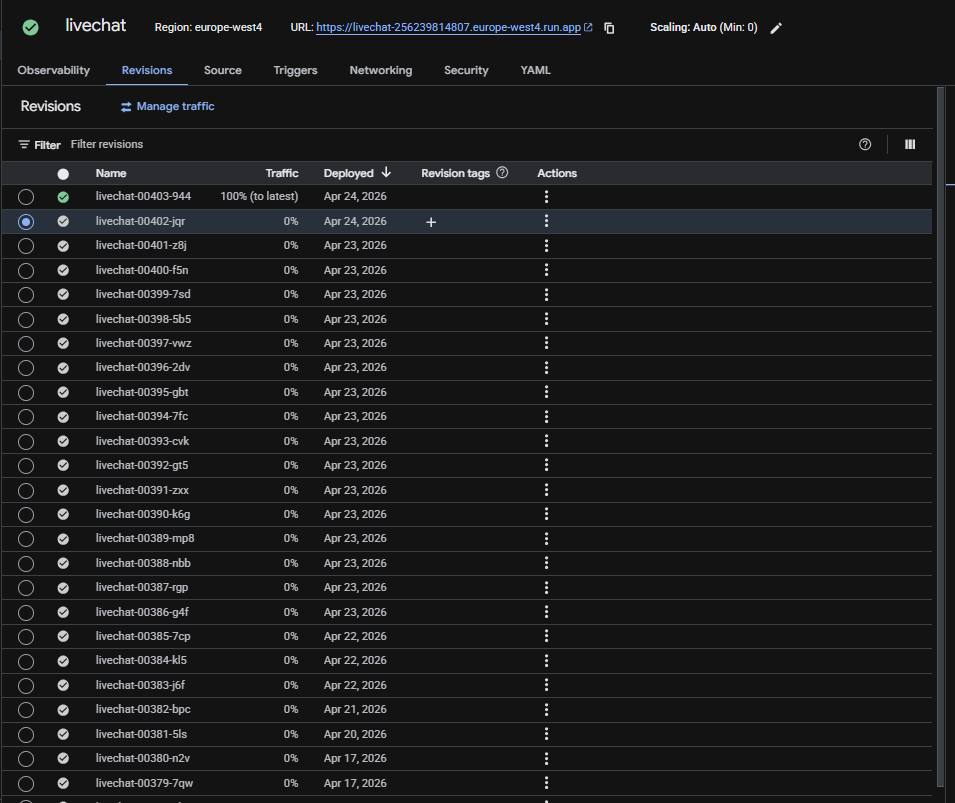
-
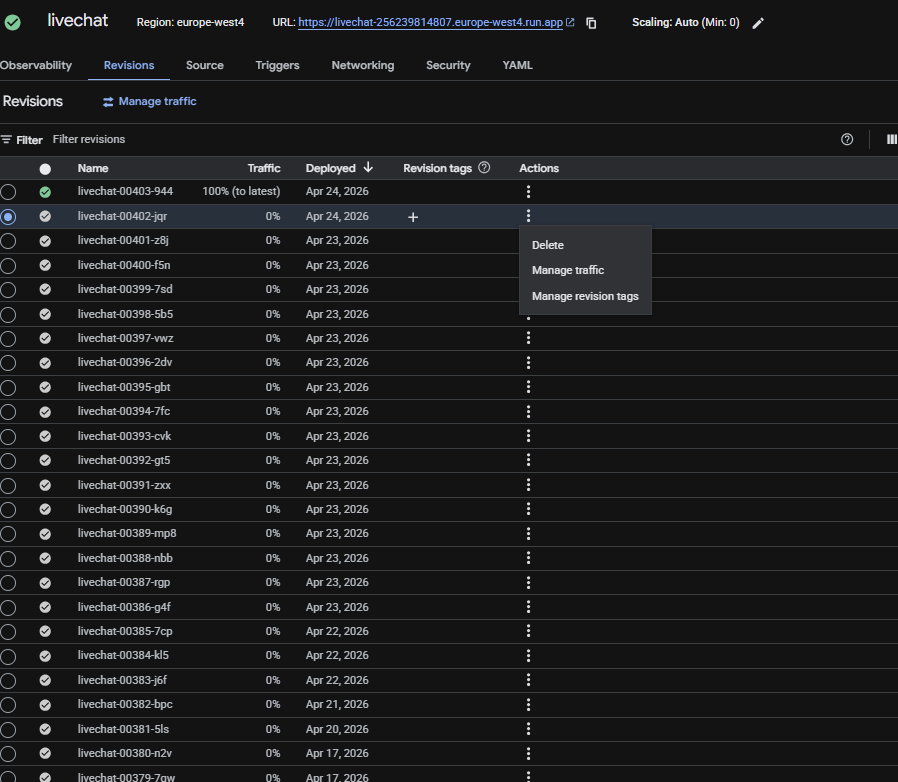
Click on the specified revision in which you want to route the traffic to and then click actions of that revision and then click Manage traffic.
-
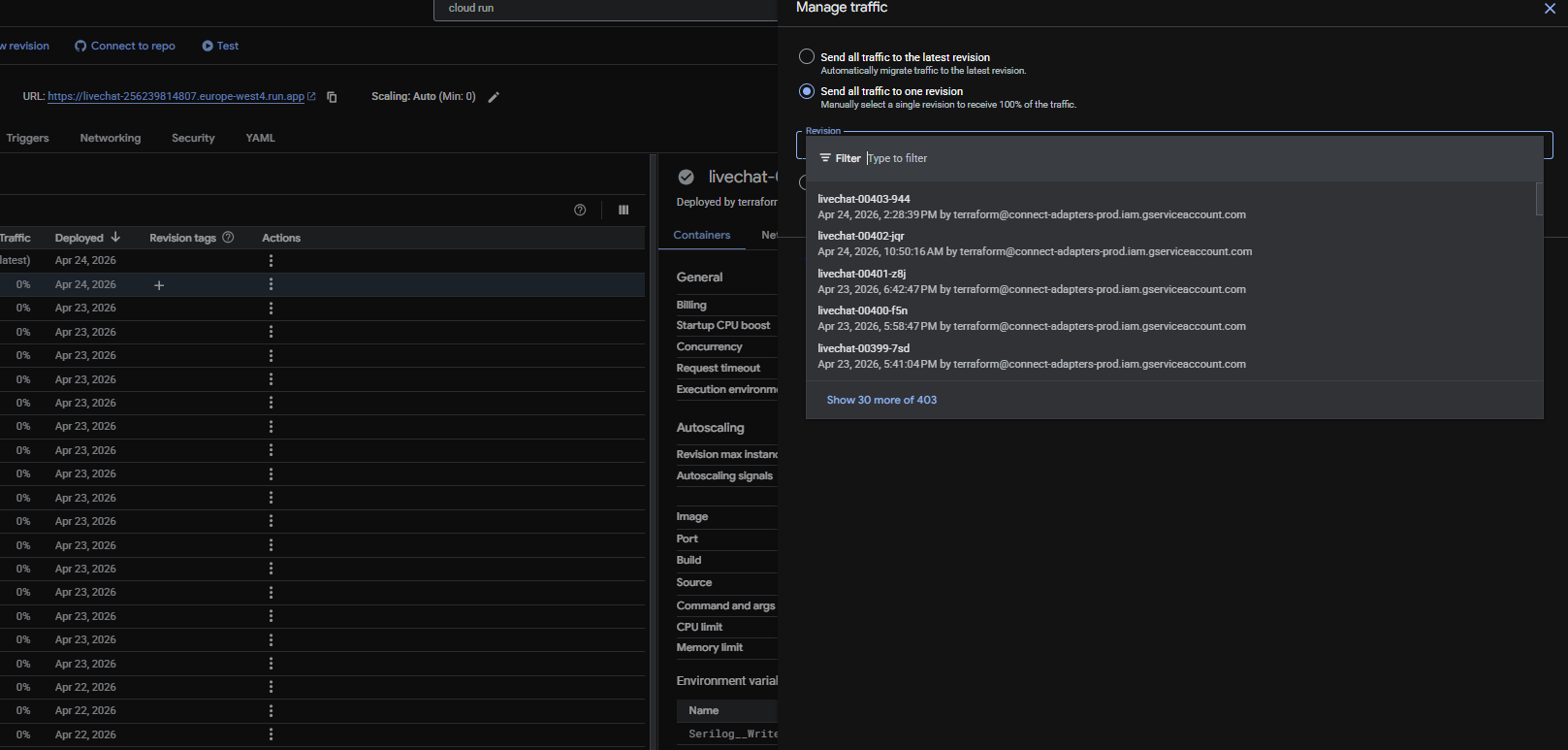
Click on Send all traffic to one revision, and select the specified revision you want to route.
-
Click Save
Recovery time: Traffic shift is immediate.
14.2 Database Rollback
Option A — Point-in-Time Recovery (PITR)
Use this when a bad migration or data corruption has occurred. Restores the database to any second within the last 7 days.
Step 1 — Identify the target recovery time:
Determine the timestamp just before the incident (check deploy logs, migration logs, or Cloud Logging).
Step 2 — Create a clone from PITR:
# Restore to a specific point in time (creates a NEW instance)
gcloud sql instances clone connectcoredb connectcoredb-recovery \
  --project=<PROJECT_ID> \
  --point-in-time="2026-05-14T08:30:00.000Z"
Step 3 — Validate the recovered data:
Connect to the recovery instance and verify the data is correct before switching.
# Connect via Cloud SQL Proxy
cloud-sql-proxy <PROJECT_ID>:europe-west4:connectcoredb-recovery
Step 4 — Switch application to recovered instance:
Update the Terraform configuration or connection strings to point to the recovery instance, then redeploy.
Step 5 — Clean up:
Once validated, the old instance can be decommissioned and the recovery instance renamed if needed.
Recovery time: 10-30 minutes depending on database size.
Option B — Restore from Daily Backup
Use this when PITR is insufficient (e.g., corrupted transaction logs).
# List available backups
gcloud sql backups list \
  --instance=connectcoredb \
  --project=<PROJECT_ID>

# Restore from a specific backup (creates a NEW instance)
gcloud sql instances clone connectcoredb connectcoredb-restored \
  --project=<PROJECT_ID> \
  --source-backup-id=<BACKUP_ID>
Recovery time: 15-45 minutes depending on backup size.
Option C — Database Migration Rollback
Use this when a bad EF Core migration needs to be reverted. Database migrations are run via the reusable workflow gcp-postgres-migration.yml using dotnet ef database update.
# Roll back to a specific migration (run from CI/CD or locally via Cloud SQL Proxy)
dotnet ef database update <PreviousMigrationName> \
  --project "<migration-project>" \
  --startup-project "<startup-project>" \
  --connection "<connection-string>" \
  --context "<DbContext>"
Important: EF Core migrations should be written to be reversible (include a Down() method). Always verify the migration rollback in the Acceptance environment before applying to Production.
Recovery time: 1-5 minutes for schema-only migrations; longer for data migrations.
14.3 Infrastructure Rollback (Terraform)
Use this when a Terraform apply introduces a bad infrastructure change.
Option A — Revert the Git commit and re-deploy:
# 1. Identify the last good commit
git log --oneline infra/environments/production/

# 2. Revert the bad commit
git revert <BAD_COMMIT_SHA>

# 3. Push and trigger production deploy workflow
# This runs terraform plan + apply with the reverted configuration
Option B — Re-apply from a previous Terraform state:
# 1. Check Terraform state history (if using remote state with versioning)
# 2. Re-run deploy-prod.yaml from the last known good commit
gh workflow run deploy-prod.yaml --ref <LAST_GOOD_COMMIT>
Option C — Manual Terraform rollback:
# Navigate to production environment
cd infra/environments/production

# Initialize and plan with the reverted config
terraform init
terraform plan -var-file="../../../deploy/app/config/production.tfvars.json" -out=rollback-plan

# Review the plan carefully, then apply
terraform apply rollback-plan
Recovery time: 2-10 minutes depending on the resource type being changed.
14.4 Pub/Sub Dead Letter Queue Recovery
Use this when messages have been routed to the dead-letter queue (Events-error) and need to be reprocessed.
Step 1 — Inspect failed messages:
# Pull messages from the dead-letter subscription (without acknowledging)
gcloud pubsub subscriptions pull dead-letter \
  --project=<PROJECT_ID> \
  --limit=10 \
  --auto-ack=false
Step 2 — Identify and fix the root cause:
Check the message attributes and payload to understand why delivery failed. Fix the underlying service issue first.
Step 3 — Republish messages to the main topic:
# Republish a message to the Events topic for reprocessing
gcloud pubsub topics publish Events \
  --project=<PROJECT_ID> \
  --message="<MESSAGE_DATA>" \
  --attribute="integration=CRM,integrationName=CRM"
Step 4 — Acknowledge the dead-letter messages:
Once messages are reprocessed successfully, acknowledge them in the dead-letter subscription to prevent reprocessing.
Recovery time: Varies — depends on message volume and root cause fix time.
14.5 Redis Cache Rollback
Redis cache is ephemeral — there is no rollback. If cache becomes corrupted or stale:
Step 1 — Flush specific keys:
# Connect to Redis via VPC and flush keys for a specific service
redis-cli -h <REDIS_HOST> -p 6379
> KEYS CRM_*          # List keys for a service
> DEL CRM_<key>       # Delete specific stale keys
Step 2 — Or flush all keys (full cache reset):
redis-cli -h <REDIS_HOST> -p 6379
> FLUSHALL
All services are designed to handle cache misses gracefully — they fall back to the database. A full flush causes temporary performance degradation (more DB queries) but no functional impact.
Recovery time: Immediate (flush). Cache repopulation happens automatically as requests flow in.
14.6 Rollback Decision Matrix
| Symptom | Likely Cause | Rollback Procedure | Recovery Time |
|---|---|---|---|
| 5xx errors after deploy | Bad application code | 14.1 Cloud Run Rollback | Under 30 seconds |
| 5xx errors + DB errors in logs | Bad migration | 14.2C Migration Rollback | 1-5 minutes |
| Data corruption discovered | Bad data migration or bug | 14.2A PITR Recovery | 10-30 minutes |
| Infrastructure broken (networking, scaling) | Bad Terraform change | 14.3 Terraform Rollback | 2-10 minutes |
| Messages stuck / not processing | Service bug or config issue | 14.4 DLQ Recovery | Varies |
| Stale data shown to users | Cache corruption | 14.5 Redis Flush | Immediate |
| Multiple systems affected | Bad Terraform + app deploy | 14.1 + 14.3 combined | 5-15 minutes |
15. Production vs Acceptance Comparison
| Aspect | Production | Acceptance |
|---|---|---|
| Database Availability | REGIONAL (multi-zone HA) | ZONAL (single zone) |
| Database Tier | db-custom-1-3840 (3.8GB RAM) | db-f1-micro |
| Database Disk | 20GB SSD, auto-resize | 10GB SSD |
| Cloud Run Memory | 1Gi-2Gi | 512Mi |
| Cloud Run Max Scale | 10 | 1-5 |
| Cloud Run Min Scale | 1-2 | 0-1 |
| Redis Memory | 1GB | 1GB |
| Pub/Sub Retention | 7 days | 7 days |
| Cloud Tasks Max Retry | 3 | 3 |
| Monitoring Alerts | Enabled | Enabled |
16. Summary of HA Guarantees
| Failure Scenario | Mitigation | Rollback Procedure |
|---|---|---|
| Database zone failure | Regional HA — automatic failover to standby in another zone | Automatic (Cloud SQL) |
| Database data loss | PITR + 7 daily backups in EU | 14.2A PITR or 14.2B Backup Restore |
| Bad database migration | EF Core reversible migrations | 14.2C Migration Rollback |
| Service instance crash | Cloud Run auto-replaces; min 1-2 instances always running | Automatic (Cloud Run) |
| Traffic spike | Auto-scale up to 10 instances per service | Automatic (Knative) |
| Bad application deployment | Cloud Run revision-based traffic management | 14.1 Cloud Run Rollback |
| Message delivery failure | Pub/Sub retries with exponential backoff (10s-600s), DLQ after 5 attempts | 14.4 DLQ Recovery |
| Task execution failure | Cloud Tasks retries 3x with backoff (3s-1hr) | Automatic (Cloud Tasks) |
| SSE connection drop | Polly WaitAndRetryForever with 5s intervals; Last-Event-Id resume | Automatic (Polly) |
| Service shutdown during SSE | Graceful shutdown persists all event IDs to Redis cache | Automatic (BackgroundService) |
| External API failure | Polly retry with exponential backoff (2s, 4s, 6s...) | Automatic (Polly) |
| Network egress failure | VPC Access Connector with 2-10 instances, auto-scales | Automatic (GCP) |
| Bad infrastructure change | Terraform plan/apply pipeline with environment protection | 14.3 Terraform Rollback |
| 5xx errors in production | Automated alerting within 60 seconds, email to team | 14.1 Cloud Run Rollback |
| Cache corruption | Ephemeral cache with graceful miss handling | 14.5 Redis Flush |
| Secret compromise | Per-service secret categories in Secret Manager; env-var injection | Rotate in Secret Manager, redeploy |
Last updated: May 2026