Infrastructure Automation (Terraform)
Table of Contents
Overview
This document discusses the established Terraform-managed infrastructure, the related CI/CD pipeline and guidelines for usage and development.
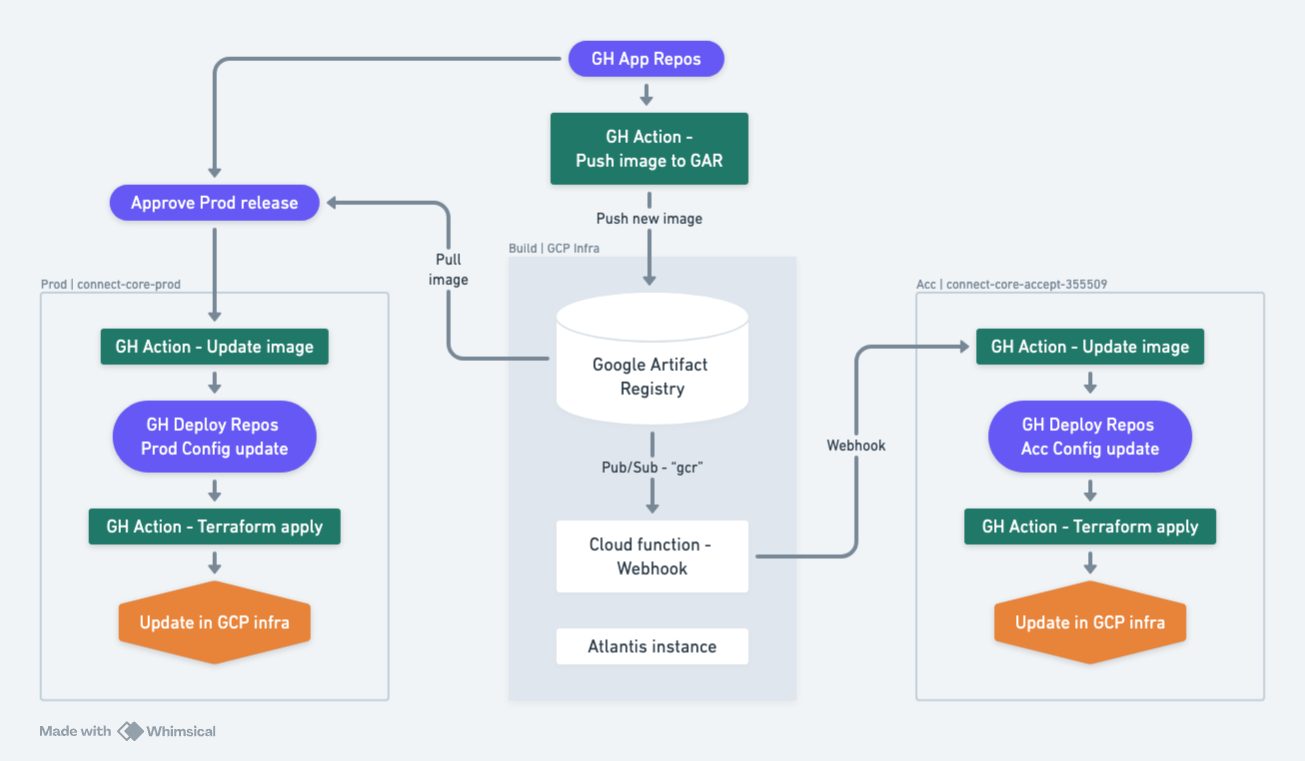
Automation flow
Key elements
- **Build project: **connect-adapters-prod
- **Acceptance project: **connect-core-accept-355509
- **Production project: **connect-core-prod
- **Artifact registry repo: **services
- Cloud function: connect-adapters-prod → gcr-webhook-publisher
- Pub/Sub Topic and subscription:
- Topic: gcr (Click to know more)
- Subscription: eventarc-europe-west4-gcr-webhook-publisher-947541-sub-935
- Atlantis instance: connect-adapters-prod → VM instances
Repository Structure
The deploy repository stores the Terraform code for the infrastructure, as well as the app configurations - for the deployed Cloud Run instances.
Note: If you see any terraform repositories, we have separated the code into multiple files but those does not have special meanings. The name of the file can be anything as long as they are all in the same directory path. While compilation terraform compiles all the .tf files into one. The names like locals.tf, variables.tf, main.tf are just logical separation.
app directory
This stores the app configuration - in practice the latest running images. The json files here are updated through cloud-function trigger to github action when a new image is pushed in artifact repository
infrastructure directory
environmentshas the environment-specific configurations for infrastructure.modulesdefines modules which host groups of related infrastructure, e.g.vpc_networkdefines the nets, subnets, firewalls, routers, static IPs, etc. You can learn about how to build and use modules here. Modules in our case are defined in the directories with self-explanatory names.
Image updates - the “Fast Path”
Image updates are done frequently, multiple times per day. The infrastructure for this is set up by the Terraform code.
- **Deploying to Acceptance. **This is accomplished by pushing from any branch on the app repository. The pipeline automatically deploys it on the acceptance project without any manual intervention.
- Deploying to Production. This requires triggering workflow in production environment which will update the image url in variables of production config in deployment repo, then it will apply those terraform changes. Here we don’t need to push any images, the workflow inside app repositories will fetch the image details from artifact registry and update on the deployment repo.
Infrastructure updates - the “Slow Path”
Infrastructure updates are ideally managed through Terraform rather than manual changes. The process involves developing and deploying new infrastructure, starting from an acceptance environment, monitoring changes via Atlantis, and proceeding through a structured review and approval process before moving to production.
- Start in Acceptance Environment: Begin with any new infrastructure changes or updates in a designated acceptance environment to test and validate the changes.
- Monitor Changes via Atlantis: Use Atlantis to monitor and review the planned changes through a pull request (PR). Atlantis automates Terraform operations and ensures changes are tracked.
- Review and Apply Plan: Review the Terraform plan generated for the changes. If the plan is satisfactory, apply it and merge the PR to implement the changes in the acceptance environment.
- Prepare for Production: After successful validation and testing in acceptance, prepare the infrastructure changes for production by opening a new PR for the production environment.
- Final Review and Apply: Review the Terraform plan for production changes. Once it is approved, apply the plan and merge the PR to deploy the changes in the production environment.
Follow the learning path
Running it locally
- Move to acceptance folder inside environments and start applying terraform commands
- terraform init
- terraform plan -var-file ../../../deploy/app/config/acceptance.tfvars.json
- terraform apply -var-file ../../../deploy/app/config/acceptance.tfvars.json