Marketplace UI V2 [Admin Panel]
Since April 2025, we are using Admin panel to manage all the Marketplace backend. And from this Admin Panel we can only support Marketplace Frontend V2.
Marketplace frontend is developed in angular, and it is completely dynamic website, we can add Metadata in backend to make component visible. It supports both light and dark mode
Create New Adapter
Metadata Structure
The metadata for the adapter is structured in a JSON format. Below is a sample metadata structure that users can reference:
{
  "v2": {
    "tabs": [
      {
        "key": "CHANNEL_ENGINE",
        "icon": "channel",
        "displayName": "Channel Engine Details"
      },
      {
        "key": "PRODUCT_FEED",
        "icon": "store",
        "displayName": "Product Feed Details"
      }
    ],
    "sections": [
      {
        "name": "Sync Data",
        "description": "You can manually sync the data anytime from **Channel Engine** to **Product Feed**.",
        "memberItems": [
          {
            "icon": "sync-true",
            "type": "restRequestButton",
            "value": "",
            "request": {
              "url": "https://api.cm.com/marketplace/product-feed/v1/tenants/{tenantId}/adapters/{tenantAdapterId}/sync-now?apiKey={apiKey}",
              "method": "post",
              "successMessage": "Syncing is in progress in the background. This may take 3 to 4 minutes to complete."
            },
            "displayName": "Sync Now"
          }
        ]
      }
    ]
  },
  "description": "ChannelEngine is a leading marketplace integration platform that connects brands and retailers to over 950 global marketplaces. It centralizes product listings, inventory, orders, and pricing, enabling businesses to streamline multi-channel operations and drive profitable growth through smart automation and seamless integrations.",
  "displayName": "Channel Engine"
}
Key Components of Metadata
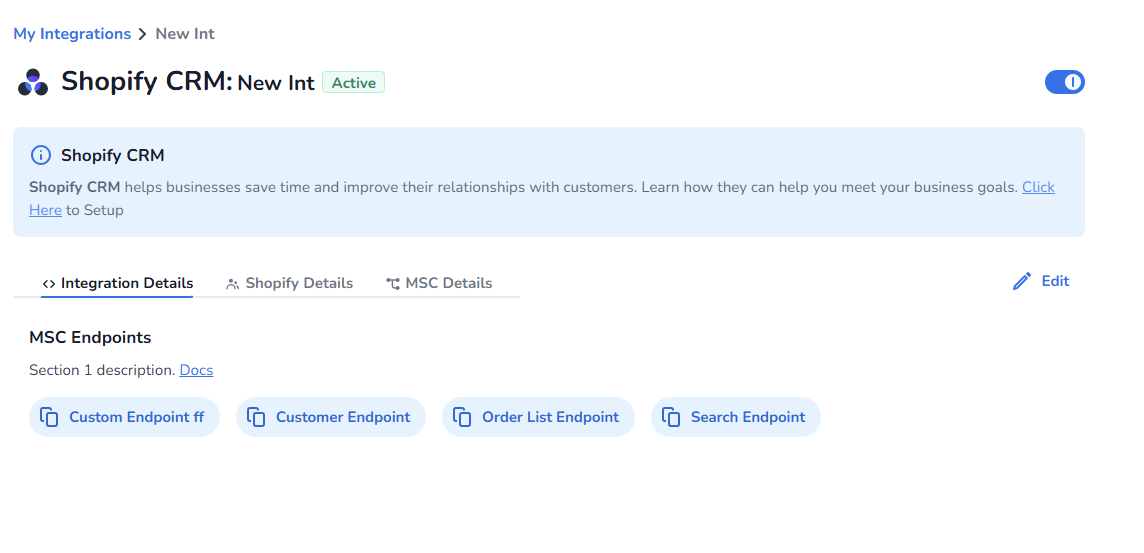
- Tabs: Defines the different sections of the adapter interface.
- Sections: Contains detailed information and actions related to each tab.
- Section Contains: Name, description
- Section Contains MemberItems
- Member Item will have following type
- Specifies the actions that can be performed. The following types are supported:
- copyButton: A button that allows users to copy information to the clipboard.
- inlineNotification: Notification
-
restRequestButton: A button that triggers a REST API request. (ex below)
{
        "icon": "sync-true",
        "displayName": "Test connection"
        "type": "restRequestButton",
        "request": {
            "url": "URL",
            "method": "METHOD like GET, POST, PUT",
            "successMessage": "The Message need to display after success full request"
        }
    }
}
-
redirectButton: A button that redirects users to a specified URL.
{
        "icon": "sync-true",
        "displayName": "Test connection"
        "type": "redirectButton",
        "reRedirect": {
        "url": "https://api.cmtest.nl/marketplace/configuration/v1/tenants/{tenantId}/adapters/{tenantAdapterId}/authorize",
        "target": "_self"
      }
}
-
reRouteButton: A button that reroutes users to another section or page within the application.
{
        "icon": "sync-true",
        "displayName": "Test connection"
        "type": "reRouteButton",
        "reRoute": {
          "path": "spotify"
      }
}
- Description: Provides an overview of the Channel Engine's capabilities.
Form Details Structure
The form details required for the adapter are also structured in JSON format. Below is a sample form data structure:
{
  "formData": [
    {
      "key": "name",
      "inputType": "string",
      "isRequired": true,
      "displayName": "Name"
    },
    {
      "key": "configurations.channelEngineConfigurations.feedUrl",
      "tabKey": "CHANNEL_ENGINE",
      "inputType": "string",
      "isRequired": true,
      "displayName": "Channel Engine CSV Feed URL"
    },
    {
      "key": "configurations.channelEngineConfigurations.productIdNamespace",
      "tabKey": "CHANNEL_ENGINE",
      "inputType": "string",
      "isRequired": true,
      "displayName": "Product ID Property Name"
    },
    {
      "key": "configurations.productFeedConfigurations.productSetId",
      "tabKey": "PRODUCT_FEED",
      "inputType": "string",
      "isEditable": false,
      "isRequired": true,
      "displayName": "Product Set ID"
    },
    {
      "key": "configurations.productFeedConfigurations.cronExpression",
      "tabKey": "PRODUCT_FEED",
      "inputType": "string",
      "isEditable": true,
      "isRequired": true,
      "displayName": "Cron Job Expression"
    }
  ]
}
Key Components of Form Details
- Key: Unique identifier for each form field.
- Input Type: Specifies the type of input (e.g., string, number).
- Is Required: Indicates whether the field is mandatory.
- Display Name: The label that will be shown to the user.
- Tab Key: Associates the field with a specific tab in the UI.
- Is Editable: Indicates if the field can be modified by the user.
- **Is Halo: **It is to display form in HALO