Sync limiter
Sync limiter lets you try out Quality Assurance with controlled conversation volumes. Test the platform without syncing your entire conversation history — sync a subset to learn the platform, build scorecards, and evaluate features.
Trial/test accounts only. Use sync limiter to evaluate QA with controlled data volumes.
Why sync limiter matters
When trying out QA:
- Don't want 10k conversations on day 1 — start small, learn the platform
- Want to test specific channels — sync only support team conversations first
- Need to control costs — limit volume to your evaluation budget
- Want quality over quantity — focus on understanding the tool
Sync limiter lets you do all this.
Sync modes
Choose one mode that fits your evaluation:
Conversation count mode
Cap total conversations synced per day (1–100), newest first.
Good for: Testing with a fixed daily volume.
How it works:
- Set daily limit (e.g., "50 conversations per day")
- System syncs the newest conversations first
- Limit applies to all agents in account
- Counter resets every 24 hours (UTC)
- Once limit is reached, older conversations are not synced
Example: Set limit to 30/day, evaluate a small set each morning, build rubrics gradually.
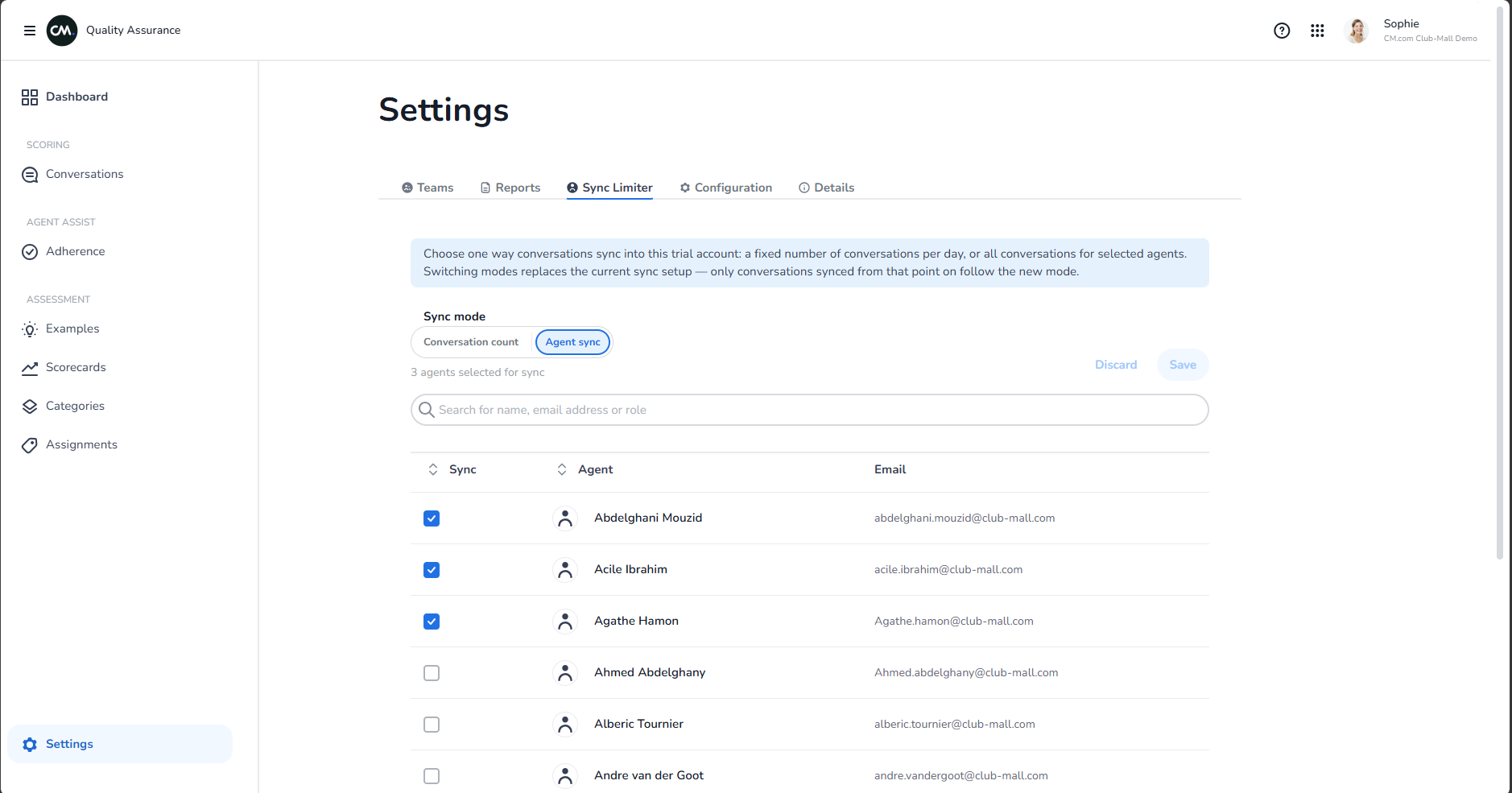
Agent sync mode
Manually select which agents' conversations to sync. All conversations from selected agents are synced; others skipped.
Good for: Testing with specific teams or departments.
How it works:
- Click agents to include or exclude from sync
- Sync is unlimited per selected agent
- Useful for department-focused trials (e.g., "just the support team")
- Add/remove agents anytime to shift focus
Example: Enable only 3 support agents, evaluate their conversations in detail, then add more agents later.
Switching modes
- Go to Settings → Sync Limiter tab
- Choose a mode:
- Conversation count — set daily limit (1–100)
- Agent sync — select agents from list
- Save
Changes take effect immediately for new conversations.
How it works
Daily reset (conversation count mode)
The 24-hour sync window resets at midnight UTC. If your limit is 50/day:
- Day 1: 50 newest conversations sync by 23:59 UTC
- Day 2 (00:00 UTC): counter resets, next 50 sync
- Older conversations: never synced if Day 1 limit was reached
Agent selection (agent sync mode)
- Selected agents: all conversations synced, unlimited volume
- Unselected agents: no conversations synced
- Switching agents: takes effect for new conversations only
Monitoring what synced
- Go to Settings → Details to check sync status and connection health
- Open Conversations tab to see what was synced (filter by date to see recent sync)
- Check Dashboard to count synced conversations in your evaluation period
Tips for trial evaluation
Week 1: Use conversation count mode, set to 20/day. Learn the UI, build first categories & scorecard.
Week 2: Increase to 40/day. Start reviewing & scoring. Calibrate with examples.
Week 3: Switch to agent sync mode. Enable 2-3 more agents. Run coaching workflows.
Week 4: Test scheduled reports, dashboards, team uploads. Ready to decide on production tier.