Introduction
The Router is CM.com's central message-routing platform for all chat applications. It forwards incoming messages to designated target applications and enables two-way communication between all connected applications.
We currently support two versions:
- Version 1 (V1): the legacy release in maintenance mode.
- Version 2 (V2): the actively supported and continuously developed release.
The Conversational Router routes messages based on a configuration that you define. To make setup as clear and simple as possible, we provide a visual configuration builder for creating and maintaining this configuration.
A configuration in the Conversational Router consists of:
- flows: a use case or scenario. Example: "Help the customer with a bot; if that doesn't succeed, hand over to a human agent."
- states: the routing behavior at a specific point within a flow (i.e., where messages are routed at that moment).
In the example above, the first state routes the customer to a bot; the second state routes the customer to an agent. If you would like to know more about states and how to switch between them, please see States.
Below is an implementation of the first state — the customer talks to a bot over the grouped WhatsApp and SMS channels, configured visually in the flow editor:
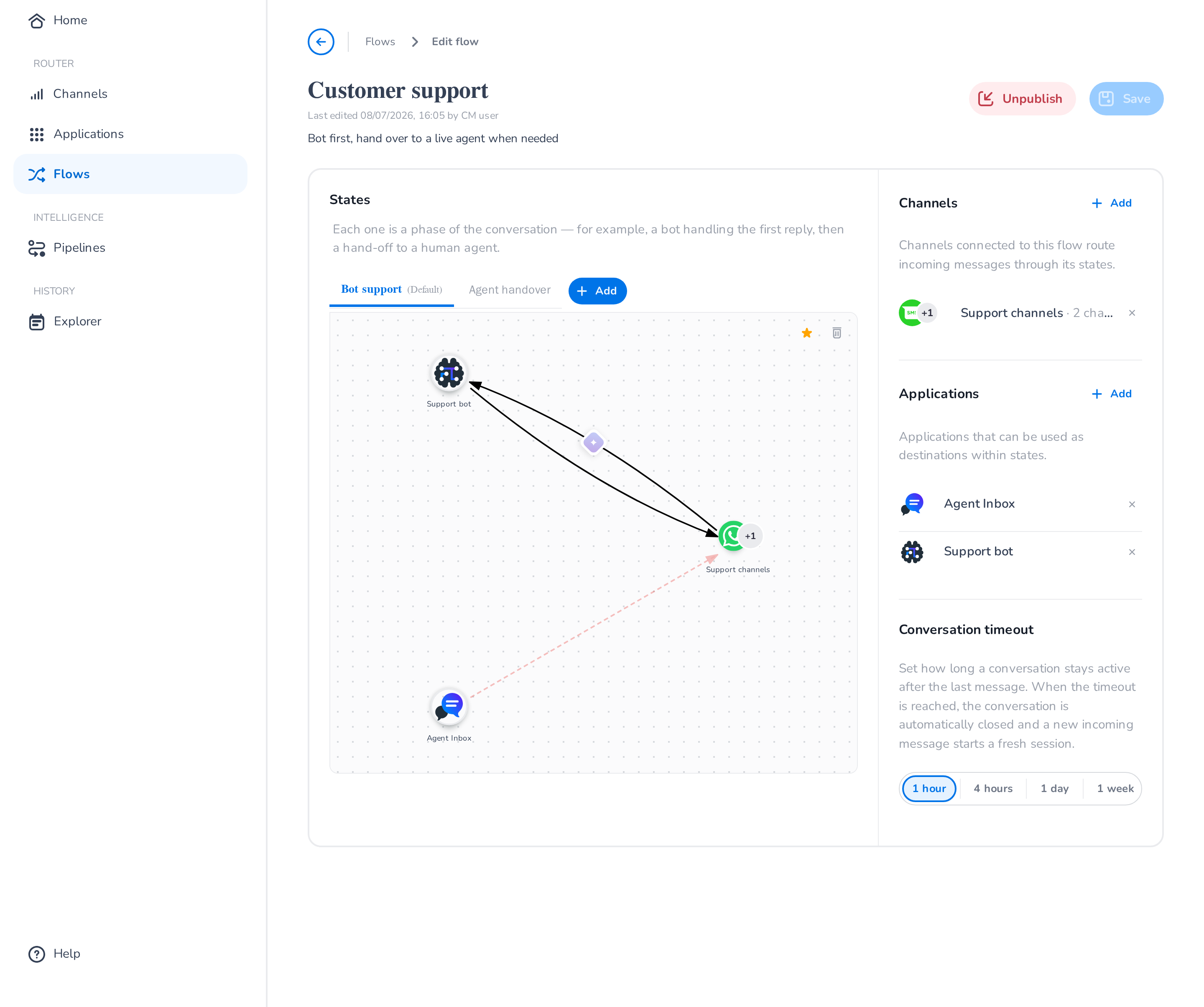
In the state shown above, links define the message flow in both directions between the support channels and the bot. When the bot determines it can no longer assist the customer, it initiates a handover to a live agent by activating the second state, in which messages flow bidirectionally between the channels and Agent Inbox instead.
The Router at a glance
Inside the Router you will find:
- Home — a dashboard of your routed traffic.
- Channels — the messaging channels your customers reach you on, optionally organized in groups.
- Applications — the destinations conversations are routed to (bots, agent inboxes, integrations).
- Flows and States — the visual routing configuration.
- Pipelines — per-link message processing such as translation and content guards.
- Explorer — browse and inspect routed conversations.
The platform's APIs are exposed externally, so third parties can integrate their own systems and benefit from the existing ecosystem of applications already connected to the Router. To explore what's possible, browse our ready-made Connections or learn how to build a Custom integration to connect your own service.